Command Line Arguments in C
In this lesson we will study command line arguments in C Language.
Command line arguments are additional information that is passed to a program when it is launched from the console. They are passed in the form of an array of strings. We will study, in this lesson, how to access them in our programs written in C.
Command Line Arguments
Often, when we launch a program from the command line, that is from the console, we need to pass additional information. Such information could be the name of a file to process, the path of a folder where to write the output, or, simply, a switch, a sort of flag that activates or deactivates a functionality of the program.
Let's take an example from the Linux world. If we want to display the content of the folder we are in, we can use the ls command, contraction of list. Typically, if we execute ls, we get an output like this:
$ ls
file1.txt file2.txt file3.txt
However, if we want to display hidden files as well, we can pass an argument to the ls command. In particular, we can pass the -a argument, which stands for all. In this way, the ls command will also display hidden files:
$ ls -a
. .. file1.txt file2.txt file3.txt .hiddenfile
If then, we want to display detailed information about the files, we can pass the -l argument, which stands for long:
$ ls -l
-rw-r--r-- 1 user user 0 Jan  1 00:00 file1.txt
-rw-r--r-- 1 user user 0 Jan  1 00:00 file2.txt
-rw-r--r-- 1 user user 0 Jan  1 00:00 file3.txt
In this case, the ls command will display detailed information about the files, such as permissions, number of links, owner, group, size, creation date and file name.
Now, these switches, marked by a dash -, are called command line arguments. They are optional, after all only the name of the file or command to execute is mandatory, but through them it is possible to customize the behavior of the program.
This additional information is called command line arguments.
Command Line Arguments
Command line arguments are additional information that is passed to a program when it is executed from the command line.
They are separated from the program name by spaces:
$ program_name argument1 argument2 argument3 ...
Access to Command Line Arguments
Command line arguments are not available only for system commands, but can be exploited by any program written in C.
To be able to access these arguments in our program we must, however, modify the signature of the main function of our program.
In particular, we must modify the main function so that it accepts two parameters called, typically, argc and argv. So the main function becomes:
int main(int argc, char *argv[])
{
    // Program code
    return 0;
}
The first parameter argc stands for argument count. It represents the total number of arguments passed to the program, including the name of the program itself.
The second parameter argv stands for argument vector. It is an array of strings, where each element represents an argument passed to the program.
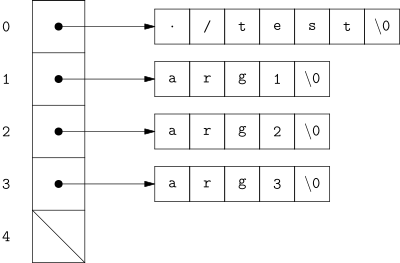
In general, argv[0] contains the name of the program, while argv[1], argv[2], ..., argv[argc-1] contain the arguments passed to the program. In addition, the argv array also contains an additional element, argv[argc], which is always NULL that is a pointer that points to nothing. We will see the NULL pointer better in the next lessons.
Based on what has been said, if we invoke a test program in this way:
$ ./test arg1 arg2 arg3
What happens is that:
argcwill be equal to4, since we passed 3 arguments to the program but we must also count its own name;argv[0]will be equal to"./test", that is the name of the program;argv[1]will be equal to"arg1", that is the first argument;argv[2]will be equal to"arg2", that is the second argument;argv[3]will be equal to"arg3", that is the third argument;argv[4]will be equal toNULL.
In memory, argv will be organized in this way:
Accessing Command Line Arguments
Since the arguments are stored in an array, most programs, in order to access them, implement a for loop that scrolls through the argv array.
For example, we can write a program that prints all the arguments passed to the program:
#include <stdio.h>

int main(int argc, char *argv[])
{
    for (int i = 0; i < argc; i++)
    {
        printf("Argument %d: %s\n", i, argv[i]);
    }

    return 0;
}
If we compile and launch the test program with the arguments arg1, arg2 and arg3, we get:
$ ./test arg1 arg2 arg3
Argument 0: ./test
Argument 1: arg1
Argument 2: arg2
Argument 3: arg3
The for loop present inside the program can be, in reality, rewritten in another way. Taking into account, in fact, that the last element of the argv array is NULL, we can modify the for loop in this way:
char **p;
int i;
for (i = 0, p = argv; *p != NULL; p++, i++) {
    printf("Argument %d: %s\n", i, *p);
}
In this way, the for loop scrolls through the argv array until it finds the NULL pointer.
Example
Let's try to write an example program, which takes various integer numbers from the command line and calculates their sum.
Before we can write the program, we need to introduce the atoi function, which converts a string into an integer number. The atoi function is defined in the stdlib.h library.
int atoi(const char *str);
The atoi function takes as input a string str and returns the corresponding integer number. If the string str does not represent an integer number, the function returns 0.
Let's start by creating the skeleton of our program:
#include <stdio.h>
#include <stdlib.h>

int main(int argc, char *argv[]) {
    int sum = 0;

    // Program code

    return 0;
}
First of all, we must check that the user has actually passed a series of parameters to the program. If argc is less than 2, then the user has not passed any parameter. In that case, we print an error message and terminate the program.
#include <stdio.h>
#include <stdlib.h>

int main(int argc, char *argv[]) {
    int sum = 0;

    if (argc < 2) {
        printf("Error: no parameter passed\n");
        return -1;
    }

    // Program code

    return 0;
}
At this point, we can calculate the sum of the numbers passed as arguments to the program. To do this, we must scroll through the argv array starting from the element argv[1], since argv[0] contains the name of the program, and convert each element into an integer number.
#include <stdio.h>
#include <stdlib.h>

int main(int argc, char *argv[]) {
    int sum = 0;

    if (argc < 2) {
        printf("Error: no parameter passed\n");
        return -1;
    }

    for (int i = 1; i < argc; i++) {
        sum += atoi(argv[i]);
    }

    printf("The sum of the passed numbers is: %d\n", sum);

    return 0;
}
If we compile and launch the program with the parameters 1, 2 and 3, we get:
$ ./sum 1 2 3
The sum of the passed numbers is: 6
The interesting thing is that if we were to insert a non-numeric parameter, the atoi function would return 0, and therefore the program would add 0 to the partial sum.
For example, if we launch the program with the parameters 1, 2 and hello, we get:
$ ./sum 1 2 hello
The sum of the passed numbers is: 3
In Summary
In this lesson we have studied command line arguments in C Language.
We have seen that, by modifying the prototype of the main function, we can access the arguments passed to the program from the command line. In particular, we have seen that the main function accepts two parameters, argc and argv, which represent respectively the total number of arguments passed to the program and an array of strings containing the arguments themselves.
In particular, argv is an array of strings, where each element represents an argument passed to the program. The element argv[0] contains the name of the program, while the elements argv[1], argv[2], ..., argv[argc-1] contain the arguments passed to the program. The element argv[argc] is always NULL.
Finally, we have seen an example of a program that calculates the sum of numbers passed as arguments from the command line.