Memory and Pointers in C: Introduction
Pointers in C language are, rightly or wrongly, one of the most misunderstood concepts by those approaching this language. They are, however, fundamental but to understand them you need to learn some fundamental concepts.
In this lesson, the concepts underlying pointers will be introduced, such as the operation of the processor, RAM memory and the system bus in a simplified way. It will be explained how the processor reasons in terms of addresses and memory locations.
We will try to understand how the compiler abstracts this mechanism through the association of a memory address with each variable and how variables are stored in memory.
Additionally, the use of the address operator & will be presented, which allows obtaining the address of a variable.
Once these concepts are understood, starting from the next lesson, we will enter into the heart of studying pointers.
- Before studying pointers it is necessary to understand the interactions between processor and memory;
- We reason in terms of variables; the processor reasons in terms of addresses and locations;
- A RAM memory is organized in locations, that is bytes, identified by a unique address;
- To each variable corresponds an address of a memory location;
- When the processor wants to obtain the value of a variable it requests the content of the location corresponding to its address from the memory;
- A variable can occupy one or more memory locations;
- Through the address operator,
&, it is possible to obtain the address of a variable.
Processor, Memory and Bus
Before being able to understand what a pointer is, it is necessary to pause for a moment on how memory works and how a program written in C accesses it.
You need to be clear about how the processor interacts with the memory itself. For this reason, here we will make a brief excursus on the internal functioning of processor, memory and bus.
Processor
The main component of a computer, whether it is a desktop computer, laptop, server or smartphone, is represented by the processor. The purpose of a processor is to execute the instructions contained in programs and apply them to the data provided as input.
To be able to perform the instructions of a program and work on data, it is necessary for the processor to bring this information to its interior. In technical jargon, the processor loads instructions and data internally to be able to work comfortably on them.
For this purpose, the vast majority of processors are equipped with a small internal memory where to store instructions and data: the processor's registers. A processor is normally equipped with registers for instructions, registers for data and special registers.
In general, a register is a small memory area capable of storing a series of bits. For example, in 64-bit processors, registers can contain up to 64 bits. A register has a label with which it can be identified.
A very simplified diagram of a possible processor is the one shown in the following figure:
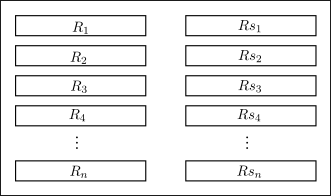
In the figure we can observe that the processor has various registers. Some, indicated with
A register can contain an instruction that tells the processor what to do and on which data to operate, while other registers can contain the data or operands on which the instruction must be applied.
However, the number of registers, that is, the internal memory of a processor, is limited. Inside a processor, it is impossible to store, in the vast majority of cases, entire programs or large data.
For this reason, the processor must make use of Memory.
Memory
Memory, often called RAM memory (from Random Access Memory), is a component of all computers whose purpose is to store instructions and data.
Nowadays, memories store data in the form of individual bytes, that is, groups of 8 bits. These bytes are stored in 8-bit registers called memory locations. Each location is associated with an address, a sort of progressive numerical identifier starting from zero. This is to ensure that one location can be uniquely distinguished from another.

For example, if we had a memory of 1 MB (one Mega byte, just over one million bytes), the addresses would go from 0 to 1048575 as shown in the figure:
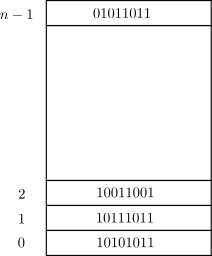
Therefore, if a memory contains
In technical jargon, it is said that an address points to a specific memory location.
Memory, locations and addresses
The Memory of a computer is a device capable of storing data.
Data is stored in the form of bytes, that is 8 bits, in memory locations.
Each memory location is associated with a unique address. An address points to a specific location.
On the bytes contained in memory, two operations can be applied:
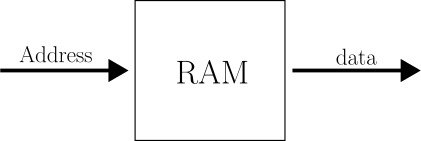
- Read: the memory is requested for a specific byte. In particular, an address is given as input to the memory and as output the corresponding byte is obtained;
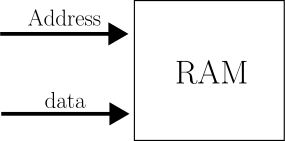
- Write: a specific byte is modified. The memory is given as input both the address and the new value of the byte to be modified.
By exploiting these two operations, the processor is able to work on programs and data of large dimensions. To do this, it is necessary to introduce a third fundamental component of interconnection between processor and memory: the Bus.
Bus
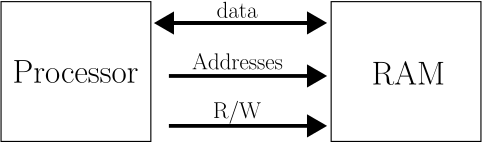
In the diagram above, the interconnection between the processor and RAM memory is represented in a very simplified way. The large arrows present in the diagram are called Bus (from Latin omnibus) of the system and allow data and other information to be exchanged between components. These are, in practice, electrical lines that connect the components and through which data flows in binary format, that is, as zeros and ones.
In the simplified diagram above, there are three buses:
- Data Bus: which allows the exchange of data between the processor and RAM memory. Data can flow in both directions;
- Address Bus: on which the processor places the address of interest to the memory. This bus allows addresses to flow exclusively from the processor to the memory;
- Control Bus: on which the processor specifies which operation the memory must perform, whether it is a read (R) or a write (W).
When the processor needs data or a new instruction, it performs three operations:
- Places the address of the data or instruction it needs on the address bus;
- Sets the control bus to indicate to the memory that it intends to read;
- Waits from the data bus for the requested information (one or more bytes).
Conversely, when the processor needs to store data in memory, it performs the following operations:
- Places the data on the data bus;
- Places the destination address on the address bus;
- Sets the control bus to indicate to the memory that it intends to write.
This diagram is very simplified but it serves to provide a general idea about the collaboration between processor and memory. It is fundamental to have this diagram in mind when you want to tackle the study of pointers in C language as we will see shortly.
Programs, Variables and Memory
When we program, not only in C language, but in any high-level programming language, we do not have to worry about all the details of interaction between processor and memory. The compiler has the purpose of translating a program written in a language for humans into a series of instructions that a processor is able to understand.
Let's take an example of code in C language:
int a = 10;
int b = 20;
int c;

c = a + b;
In this case, we have three variables, a, b and c and an instruction that adds a and b and saves the result in c.
A processor does not reason in terms of variables, but only and exclusively in terms of locations and addresses. The processor is not able to understand who a or b is nor is it able to understand where to save the result of their sum.
For this reason, the compiler has the purpose of transforming the code into something that the processor is able to execute.
First, you need to translate variables into addresses. A compiler, in fact, analyzes the code, identifies the variables present and assigns an address to each one. How this happens doesn't matter in this lesson. What matters is that the result of this first operation is a kind of table that the compiler maintains internally and that it will use in a later step. One of the purposes for which compilers are born is precisely to compile a table of this type.
This table could have an aspect like this:
variable a -> address: 2300
variable b -> address: 3120
variable c -> address: 4510
The table, therefore, contains a series of addresses that point to the locations where the values of the variables are stored.
In a second step, the compiler transforms the instructions of the program into one or more instructions of the processor. In fact, in most cases a single C instruction can result in many processor instructions.
Let's try to see how the instruction "c = a + b;" could be translated into instructions for a hypothetical processor.
First, we need to load variable a into a processor register. But variable a is at address 2300 so:
LOAD THE CONTENT OF 2300 INTO R1
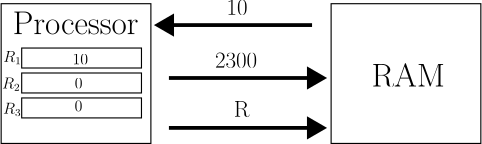
When the processor encounters this instruction, it loads the byte located at address 2300 of the memory into register R1.
Next, you need to load variable b into a register. But variable b is at address 3120 so:
LOAD THE CONTENT OF 3120 INTO R2
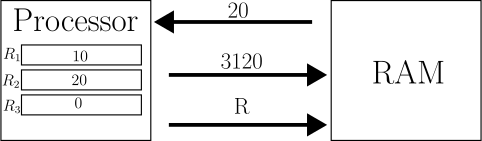
At this point, the processor has all the information it needs to perform the sum. So the compiler will produce an instruction like:
ADD R1 AND R2 AND PLACE THE RESULT IN R3
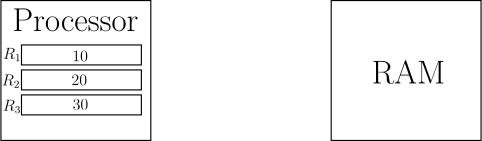
This instruction tells the hypothetical processor to add the data contained in R1 to the data contained in R2 and store it in register R3.
The result, however, is still inside the processor and must be brought out and saved in memory in variable c, that is, at address 4510. So, the final instruction that the compiler will produce will be something like:
SAVE THE CONTENT OF R3 IN 4510
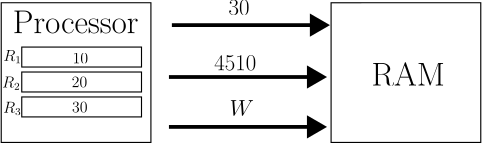
That is, save the content of register R3 at memory location 4510.
So the final instruction list for the processor will be:
LOAD THE CONTENT OF 2300 INTO R1
LOAD THE CONTENT OF 3120 INTO R2
ADD R1 AND R2 AND PLACE THE RESULT IN R3
SAVE THE CONTENT OF R3 IN 4510
The instructions we have seen are hypothetical, they serve to show the concept. But ultimately they are not so dissimilar to the instructions of a real processor.
What you need to understand is that without compilers and without programming languages, you have to work with the processor in this way, that is, with addresses instead of variables.
The essence of this discourse is that:
Each variable corresponds to an address in memory.
The compiler associates with each variable defined in C language an address in memory. This address corresponds to a location in memory that contains the actual data.
Essentially, a variable is a label corresponding to an address that points to a memory location.
Variables and Addresses
In the previous section, we saw that the compiler associates with each variable a physical address of the memory. In the location corresponding to that address, the data is actually stored. We who develop reason in terms of symbolic names rather than addresses. After all, this is the main reason why compilers were born.
A variable, however, can be of a type that occupies more than a single byte. Let's take, for example, a variable of type double. We know that a double variable occupies 64 bits, that is, 8 bytes.
For this reason, a single variable can correspond to multiple consecutive memory locations. In this case, the address associated with the variable corresponds to the first location where the value is stored. To clarify everything, just look at the figure:
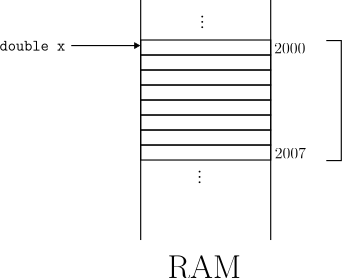
In this example, variable x of type double is stored at address 2000. But this means that its value will occupy memory locations from 2000 to 2007.
Address of a variable
The memory address of a variable that occupies more than one byte corresponds to the first byte in memory of the variable itself.
Address Operator &
The compiler, as we have seen, hides the complexity of having to work directly with memory addresses and allows us to concentrate on higher-level problems. We just have to take care of defining our variables with meaningful names and using them in our programs.
However, in C language it is possible to trace back to the address assigned by the compiler to a variable. This is one of the strengths of C language. In many languages, such as Java, this operation is not possible.
To obtain the memory address of a variable, simply use the address operator: &.
The syntax is very simple, as you just have to use the operator in front of the variable whose address you want to obtain.
For example, suppose we have a variable a and we want to print its address on the screen. We could achieve this in this way:
1 2 3 4 5 6 7 8 | |
If we try to compile and execute the program above, we can obtain an output like the following:
Value of a:    5
Address of a: 0x7ffeedc4c8ac
So, in this example, the compiler has assigned address 0x7ffeedc4c8ac to variable a. Obviously, the result may change.
The interesting thing to note is that the result of the & operator is entirely an integer. More precisely, an unsigned integer, an unsigned. In fact, in the printf we used the %p specifier which allows printing, in hexadecimal, the address of a variable.
From here the next step: being an integer, the address of a variable can be used in expressions or, even the address of a variable can be stored in another one.
This fundamental mechanism is the basis of pointers that we will study in the next lessons. The ability to obtain the addresses of variables and work directly with them represents one of the greatest strengths of C language.
Obviously, as the saying goes "With great power comes great responsibility" so a mechanism of such power can also cause errors that are difficult to find. Many languages, in fact, do without pointers to avoid programming problems. In Java and Python, for example, pointers are not supported.
To recap:
Address Operator &
In C language, the address operator, &, allows obtaining the address assigned to a variable.
The syntax is as follows:
&variable_name
The result provided is an unsigned integer that can be assigned to another variable or used in other expressions.
One last note before entering into the heart of studying pointers: previously we have already used the address operator without knowing it. When, in fact, we use the scanf function to read data from the command line, we must pass the address of the variable that will receive the result.
This is why, to read for example an integer value and store it in a variable x, we must use the address operator in this way:
int x;

printf("Insert a number: ");
scanf("%d", &x);
The address operator and the scanf function
The scanf function allows storing values read from the command line and storing them in variables. To do this, it needs to know the address of the destination variables. For this reason, the address operator & is used, for example:
scanf("%d", &x);
In Summary
In this article, we introduced some concepts preparatory to the study of pointers in C language. We saw how the processor, RAM memory and system bus work in a simplified way and how the compiler abstracts the memory addressing mechanism through the association of a memory address with each variable. We also saw the use of the address operator & which allows obtaining the address of a variable.
These concepts are fundamental to understanding the internal functioning of the computer and to becoming an expert C programmer. Now that we have understood the basic concepts, in the next lesson we will enter into the heart of studying pointers in C language, to deepen their functioning and their applications.