Struct Variables in C
A data structure is a set of elements that are logically related to each other. These elements are not necessarily of the same type.
In C language it is possible to declare a variable as a data structure using the keyword struct. The elements that compose the structure are called members or fields of the structure.
In this lesson we see how to declare a variable of type struct and how to access the fields that compose it.
struct
So far, in the lessons on C language we have observed exclusively a single type of data structure: arrays. Arrays have the property that all the elements that compose them are homogeneous, that is, they are of the same type. Furthermore, to access the elements of an array we have used the indexing operator: [], through which we specify the position of the element to access. This is possible because arrays are sequences of elements.
Now we begin the study of structures mainly called struct in C language. The properties of a struct are very different from those of an array. First of all there is no constraint on the type of elements that compose a structure. In technical jargon, the elements that compose a struct are called fields or more often members. The main property of the fields of a struct is that they can have different types.
The second property of the elements of a struct is that these fields have a name. To access a member of a structure it is necessary to use the name of the field.
Declaration of a struct variable
When we need to store a set of elements of different type but logically related to each other, a data structure is the ideal means.
For example, suppose we want to store the information of a telephone contact. This is because maybe we are implementing a program that acts as an address book.
In this case, a telephone contact will contain various information:
- the first name and last name of the contact;
- the age of the contact;
- the telephone number of the contact;
- the email address of the contact.
Obviously, these data are of different types. The first name and last name are strings, the age is an integer number, the telephone number is a string and the email address is a string.
To be able to store together all this logically related information we can create a variable of type struct, in this way:
struct {
    char first_name[20];
    char last_name[20];
    int age;
    char telephone_number[20];
    char email_address[20];
} contact1, contact2;
By doing so, we have declared two variables: contact1 and contact2. Each of them will have 5 members: first_name, last_name, age, telephone_number and email_address.
It should be noted that this declaration has the same form as a normal variable declaration. In fact struct { ... } specifies a type, while contact1 and contact2 are variables of that type.
Declaration of a data structure variable
In C language the syntax to declare a variable of data structure type is the following:
struct {
    type1 member_name1;
    type2 member_name2;
    /* ... */
    typeN member_nameN;
} variable_name1, variable_name2, ..., variable_nameN;
Memory organization of a struct
Typically, in memory the members of a structure are arranged in the order in which they are declared.
For example, suppose that the variable contact1 has been allocated at address 4000. At this point the first member first_name will be stored at address 4000 and will occupy 20 bytes; so first_name will occupy bytes from 4000 to 4019. The second member last_name will be stored at address 4020 and will occupy 20 bytes; so last_name will occupy bytes from 4020 to 4039. The third member age will be stored at address 4040 and being an int will occupy 4 bytes: from 4040 to 4043. Same reasoning applies to the members telephone_number and email_address. In the end the memory layout of the struct will have the following appearance:
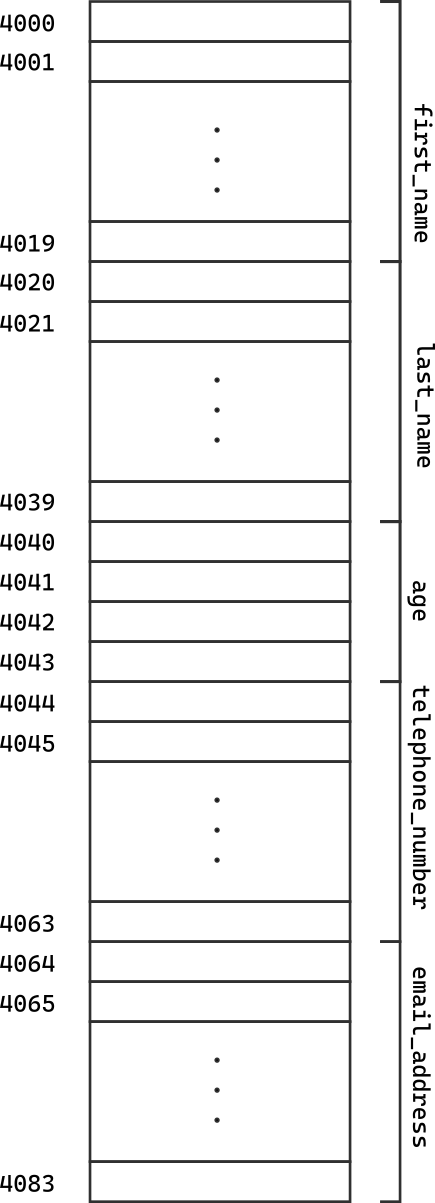
Representing structures in this way can be tedious, as we do not need to represent all these details. For this reason in the rest of these lessons we will represent structures in this simpler way:
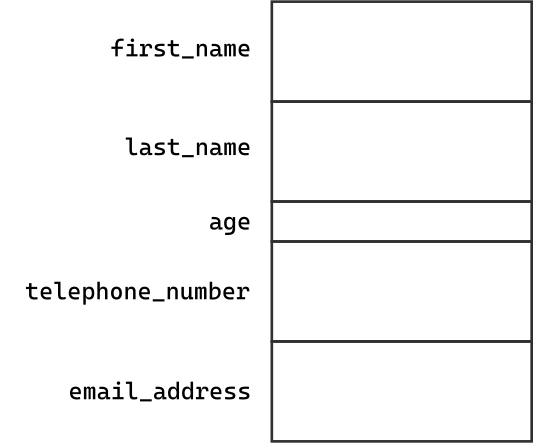
Visibility scope of the members of a struct
Whenever we declare a variable of type struct, we are effectively defining a new scope. Each name declared within this scope cannot conflict with a name declared outside of it.
For example, let's take this code snippet:
char first_name[20];
int age;

struct {
    char first_name[20];
    char last_name[20];
    int age;
    char telephone_number[20];
    char email_address[20];
} contact1, contact2;
The two variables first_name and age declared outside the struct do not conflict with the variables first_name and age declared inside the struct. This is because the members declared inside the struct are visible only within it.
Initialization of a struct
As in the case of an array a struct variable can be initialized at the same time it is declared.
To do this it is necessary to provide a list of values that must be stored within the individual members of the structure and enclose them in braces.
Returning to the example of the telephone contact, we can initialize the variable contact1 in the following way:
struct {
    char first_name[20];
    char last_name[20];
    int age;
    char telephone_number[20];
    char email_address[20];
} contact1 = {
    "John",
    "Doe",
    25,
    "1234567890",
    "john.doe@test.com" }
The values in the initialization list must appear in the same order in which the members of the structure were declared. In the example:
- the first value
"John"is assigned to the memberfirst_name; - the second value
"Doe"is assigned to the memberlast_name; - the third value
25is assigned to the memberage; - the fourth value
"1234567890"is assigned to the membertelephone_number; - the fifth value
"john.doe@test.com"is assigned to the memberemail_address.
The final result will be the following:
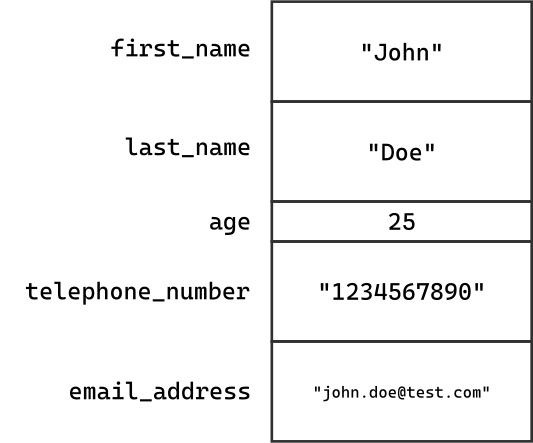
The initialization of a struct approximately follows the same array initialization rules:
- The expressions of an initialization list must be constants; in fact we cannot use variables within the list (although in the C99 standard this constraint is relaxed);
- If the number of elements in the initialization list is less than the number of members of the
struct, the remaining members will be initialized with default values.
Regarding the last point let's take the following example:
struct {
    char first_name[20];
    char last_name[20];
    int age;
    char telephone_number[20];
    char email_address[20];
} contact1 = {
    "John",
    "Doe",
    25,
    "1234567890" }
In this case the member email_address has not been initialized. The compiler will initialize it with a default value, which depends on the data type of the member. In this case the member is of type array of char, so the compiler will initialize the member with a sequence of zeros which corresponds to an empty string.
Initialization of a data structure variable
In C language to initialize a variable of data structure type you must use an initialization list.
The syntax is the following:
struct {
    type member_name1;
    type member_name2;
    ...
    type member_nameN;
} variable_name = {
    member_value1,
    member_value2,
    ...
    member_valueN
};
If the initialization list does not contain all the members of the struct, the remaining members will be initialized with default values.
Designated Initializers of a struct in C99
Just as for arrays, also for struct it is possible to use the so-called designated initializers. These initializers allow us to initialize only some members of the struct and leave the other members initialized with default values.
Let's take again the example of the telephone contact. Normally to initialize the struct we would have used the following syntax:
struct {
    char first_name[20];
    char last_name[20];
    int age;
    char telephone_number[20];
    char email_address[20];
} contact1 = {
    "John",
    "Doe",
    25,
    "1234567890",
    "john.doe@test.com" }
Using, in the C99 standard, designated initializers we can initialize the struct in this way:
struct {
    char first_name[20];
    char last_name[20];
    int age;
    char telephone_number[20];
    char email_address[20];
} contact1 = {
    .first_name = "John",
    .last_name = "Doe",
    .age = 25,
    .telephone_number = "1234567890",
    .email_address = "john.doe@test.com"
}
The designated initializer for struct has a different syntax compared to the case of arrays. In fact, it is necessary to use a dot . followed by the name of the member.
Designated initializers have a great advantage over simple initialization lists. In fact it is not necessary to respect the order of declaration of the members. We can initialize the members in any order; for example:
struct {
    char first_name[20];
    char last_name[20];
    int age;
    char telephone_number[20];
    char email_address[20];
} contact1 = {
    .email_address = "john.doe@test.com",
    .age = 25,
    .last_name = "Doe",
    .first_name = "John",
    .telephone_number = "1234567890"
}
This entails two advantages. First, the programmer does not have to remember the order in which the fields were declared. Second, if we should change the order of the fields or add intermediate fields it is not necessary to modify the initialization code.
Furthermore, it is not necessary to use designated initializers for all members of the structure. We can mix designated initializers with initialization lists. For example:
struct {
    char first_name[20];
    char last_name[20];
    int age;
    char telephone_number[20];
    char email_address[20];
} contact1 = {
    .first_name = "John",
    "Doe",
    25,
    .telephone_number = "1234567890",
    "john.doe@test.com"
}
In this case, when the compiler encounters an initialization value that does not have an associated designated initializer, it associates it with the first member of the struct that has not yet been initialized. For this reason we cannot swap the strings "Doe" and "john.doe@test.com". This is because, reached the point where the compiler encounters the string "Doe" the first uninitialized member turns out to be last_name and not email_address.
Initialization of a data structure variable with designated initializers in C99
In the C99 standard it is possible to initialize a variable of data structure type using designated initializers.
The syntax is the following:
struct {
    type member_name1;
    type member_name2;
    ...
    type member_nameN;
} variable_name = {
    .member_name1 = member_value1,
    .member_name2 = member_value2,
    ...
    .member_nameN = member_valueN
};
The order of the members is not important.
Access to the members of a struct
We have seen that the most common operation performed on arrays is access to individual elements. In the case of struct the most common operation turns out to be access to individual members.
Access to the members of a struct occurs using the name of the member and not the index as happens, instead, for arrays.
To access a member of a struct the dot operator . is used. The syntax is the following:
struct_variable_name.member_name
Therefore, returning to the example of the telephone contact, suppose we want to print the first name, last name and email address on the screen. We can do it in this way:
printf("First name: %s\n", contact1.first_name);
printf("Last name: %s\n", contact1.last_name);
printf("Email address: %s\n", contact1.email_address);
The members of a structure are always l-values and therefore can also be used as assignment operands.
contact1.age = 30;

strncpy(contact1.first_name, "Jack", 19);
The member access operator of a structure, the dot ., has the same priority as the postfix increment and decrement operators, ++ and --. Therefore, its priority is the maximum compared to the others. For example, let's take the following piece of code:
printf("Enter the age: ");
scanf("%d", &contact1.age);
The compiler interprets this code as:
printf("Enter the age: ");
scanf("%d", &(contact1.age));
In other words, the dot has precedence over the address operator &. Therefore, the address operator will take the address of the age field of the structure.
Member access operator of a structure
In C language, to access a member of a data structure the access operator . is used.
The syntax is the following:
struct_variable_name.member_name
Assignment operator and struct
A great difference between arrays and struct is that the assignment operator = cannot be used to copy two arrays. In fact the following code is illegal:
int a[10];
int b[10];

/* ERROR */
a = b;
Vice versa, in the case of struct the assignment operator = can be used to copy two struct of the same type. For example:
struct {
    char first_name[20];
    char last_name[20];
    int age;
    char telephone_number[20];
    char email_address[20];
} contact1 = {
    .first_name = "John",
    .last_name = "Doe",
    .age = 25,
    .telephone_number = "1234567890",
    .email_address = "john.doe@test.com"
},
contact2 = {
    .first_name = "Jack",
    .last_name = "Green",
    .age = 30,
    .telephone_number = "0987654321",
    .email_address = "jack.green@test.com"
};

contact1 = contact2;
In this case, the compiler copies all the members of contact2 into contact1. This behavior is similar to that of the assignment operator = for variables.
The constraint is that the two struct must be of the same type. For example, the following code is illegal:
struct {
    int field1;
    float field2;
    char field3[10];
} s1 = {
    5,
    3.14,
    "test"
};

struct {
    char field1[10];
    int field2;
    float field3;
} s2 = {
    "test2",
    10,
    2.71
};

/* ERROR */
s1 = s2;
In this case, the compiler cannot copy all the members of s2 into s1 because the types of the members are not compatible.
Assignment operator and data structures
In C language it is possible to assign the content of a variable of type struct to another variable provided that the two variables have the same type.
The syntax is the following:
struct {
    type1 field1;
    type2 field2;
    /* ... */
    typeN fieldN;
} variable1, variable2;

/* ... */

variable1 = variable2;
Using struct as arrays
Since in C language it is possible to copy compatible data structures between them, it is possible to use the assignment operator to implement a sort of copy between arrays.
For example, we can define a struct formed like this:
struct { int a[10]; } s1, s2;
In this way, s1 and s2 are two structures that contain only an array of 10 elements. We can therefore copy all the elements of s1 into s2 using the assignment operator =.
s2 = s1;
Operations prohibited on struct
In C language the only operations allowed on struct variables are access to members, through the access operator . and the assignment operator =.
There are no other global operations that can be performed on a struct. For example, it is not possible to perform comparison operations between two struct:
struct {
    int field1;
    float field2;
    char field3[10];
} s1 = {
    5,
    3.14,
    "test"
},
s2 = {
    10,
    2.71,
    "test2"
};

/* ERROR */
if (s1 == s2) {
    printf("The structures are equal\n");
}
To be able to perform a comparison we must modify the above code in this way:
struct {
    int field1;
    float field2;
    char field3[10];
} s1 = {
    5,
    3.14,
    "test"
},
s2 = {
    10,
    2.71,
    "test2"
};

if (s1.field1 == s2.field1 && s1.field2 == s2.field2 && strcmp(s1.field3, s2.field3) == 0) {
    printf("The structures are equal\n");
}
In other words we had to perform a comparison between all the members of the two struct to be able to establish whether they are equal or not.
Comparison between data structures
In C language, it is not possible to compare two struct variables using a comparison operator. To be able to perform a comparison, it is necessary to compare all the members of the two struct.
struct {
    type1 field1;
    type2 field2;
    /* ... */
    typeN fieldN;
} variable1, variable2;

/* ERROR */
if (variable1 == variable2) {
    /* ... */
}

/* CORRECT */
if (variable1.field1 == variable2.field1 &&
    variable1.field2 == variable2.field2 &&
    /* ... */ &&
    variable1.fieldN == variable2.fieldN) {
    /* ... */
}
In Summary
In this lesson we have seen how to define a struct and how to initialize it. We have seen how to access the members of a struct and how to copy two struct of the same type.
Furthermore, we have seen that the only operations allowed on struct variables are access to members, through the access operator . and the assignment operator =.
The only problem is that, whenever we need to declare a struct variable we must specify the type of all members. This can be a problem if we need to declare many struct variables of the same type. For this reason, in the next lesson we will see how to define a new data type, using struct.