Union in C
In C language there exists a structured data type called union. Unions are similar to data structures, but have some peculiar characteristics that make them particularly useful in some cases.
In particular, a union possesses members like a data structure, but at any instant in time only one of them can contain a valid value. This is because the members of a union share the same memory space.
In this lesson we will see the basics for declaring, initializing and accessing a union in C language.
Union
A union is a particular construct of C language very similar to a struct data structure. Like a struct, a union consists of one or more members, even of different types.
However, unlike a data structure, the compiler allocates exclusively the space necessary to contain the largest member. This means that all members of a union share the same memory space.
Therefore, when a value is assigned to a member of a union, the value of all other members is overwritten.
To better understand, let's take an example. Suppose we declare the following union composed of three members:
union {
    int i;
    double d;
    char c;
} u;
The declaration of this union is very similar to the declaration of a structure. For example:
struct {
    int i;
    double d;
    char c;
} s;
The main difference between the struct s and the union u is that the members of s are stored in separate memory spaces (i.e., different addresses) while the members of u are stored in the same memory space (i.e., at the same address).
Assuming that an integer occupies 4 bytes, the memory layout of s is as follows:
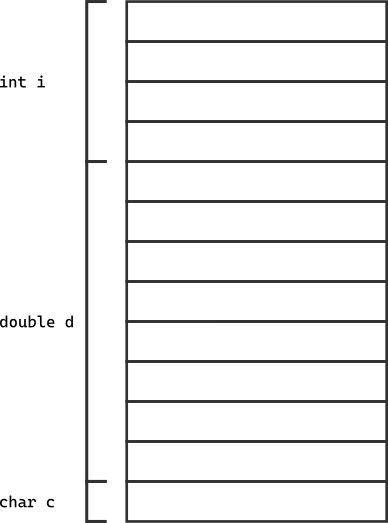
While the memory layout of u is as follows:
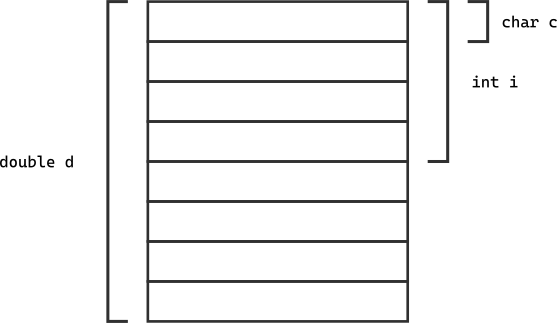
In structure s, the members i, d and c occupy different locations, so the total size of s is 13 bytes (8 for the double, 4 for the int and 1 for the char).
Conversely, in union u, the members i, d and c occupy the same memory space, so the total size of u is 8 bytes (since the maximum size is that of the double member which occupies 8 bytes).
Union
In C language a union is a data type capable of storing in an exclusive manner elements of different types.
The syntax for declaring a union is as follows:
union union_name {
    type1 name1;
    type2 name2;
    ...
    typeN nameN;
};
At any instant the content of the union is represented by the last assigned member.
Accessing members of a union
To access the members of a union, one proceeds in the same way as accessing the members of a structure: with the dot operator ..
Therefore, defining a union in this way:
union {
    int i;
    double d;
    char c;
} u;
One can access the members i, d and c with the following statements:
u.i = 10;
u.d = 3.14;
u.c = 'a';
However, since the members of the union occupy the same memory space, when a value is assigned to a member, the value of all other members is overwritten. Therefore, if we assign a value to u.i, the value stored in u.d is lost.
In practical terms, actually, the lower 4 bytes of member d, i.e., of the double, are overwritten. Therefore, if we tried to access member d perhaps the latter has no meaning.
Let's clarify with an example:
#include <stdio.h>

int main() {
    union {
        int i;
        double d;
        char c;
    } u;

    /* We first assign the integer value */
    u.i = 10000;

    /* We print the integer value */
    printf("Integer value: %d\n", u.i);

    /* We assign the double value */
    u.d = 3.14159;

    /* We print the double value */
    printf("Double value: %f\n", u.d);

    /* We print the integer value */
    printf("Integer value: %d\n", u.i);

    return 0;
}
If we try to compile and run the program we get a result like this:
Integer value: 10000
Double value: 3.141590
Integer value: -266631570
What happened is that the integer value 10000 was overwritten by the double value 3.14159. In particular, the lower 4 bytes of the double overwrote the 4 bytes of the integer. Therefore, after the assignment the integer value changed completely.
From this point of view we can see a union as a data structure capable of storing a single member in exclusive manner.
Accessing members of a union
To access the members of a union one proceeds in the same way as accessing the members of a struct: with the dot operator .:
/* Write access */
union_name.member_name = value;

/* Read access */
value = union_name.member_name;
In write, when a value is assigned to a member of a union, the value of all other members is overwritten.
In read, if one accesses a member that has not been assigned, the result might not have meaning.
Declaration of a union
Just as for struct, also for union we can declare tagged union or define a new type with typedef.
For example, we can declare a tagged union in this way:
union example {
    int i;
    double d;
    char c;
};
Subsequently we can declare union variables in this way:
union example u1;
union example u2;
Obviously, in this case we must always precede the name of the union with the keyword union.
We can define a new type with typedef in this way:
typedef union {
    int i;
    double d;
    char c;
} example;
Having done this we can declare variables of this type in this way:
example u1;
example u2;
In this case it is not necessary to precede the name of the union with the keyword union.
Declaration of a union
To declare a union we can do it in two ways:
-
Declare a tagged
union:union union_name { type1 name1; type2 name2; ... typeN nameN; };In this case, to declare a variable of type
unionwe must precede the name of the union with the keywordunion:union union_name variable_name; -
Define a new type with
typedef:typedef union { type1 name1; type2 name2; ... typeN nameN; } type_name;In this case, to declare a variable of type
unionit is not necessary to precede the name of the union with the keywordunion:type_name variable_name;
Initialization of a union
A union can be initialized similarly to how a struct is initialized.
For example, we can initialize a union in this way:
union {
    int i;
    double d;
    char c;
} u = { 10 };
In this case the value is assigned to the first member of the union. In this case the first member is i which is an int and therefore the value 10 is assigned to u.i.
In the C99 standard it is possible to use a designated initializer, so we can initialize a different member in this way:
union {
    int i;
    double d;
    char c;
} u = { .d = 3.14 };
In this case the value is assigned to the second member of the union, i.e., u.d.
Initialization of a union
A union can be initialized using an initialization list composed of a single element:
union {
    type1 name1;
    type2 name2;
    ...
    typeN nameN;
} variable_name = { value };
In this case the value is assigned to the first member of the union.
Starting from C99 it is possible to use a designated initializer to initialize a specific member:
union {
    type1 name1;
    type2 name2;
    ...
    typeN nameN;
} variable_name = { .member_name = value };
In this case the value is assigned to the specified member.
Mixed Data Structures
One of the most common uses of unions is to define mixed data structures. A mixed data structure is a structure that can contain different data types, but only one at a time. This is useful when one wants to save memory space, since the structure occupies only the space necessary for the data type currently in use.
Let's take an example, suppose we want to create a program that manages a set of geometric shapes. Each geometric shape can be a circle, a rectangle, a square, a trapezoid and so on. Each geometric shape has specific properties, for example a circle has a radius, a rectangle has a base and a height, a square has a side, a trapezoid has two bases and a height.
If we wanted to represent these geometric shapes with a data structure, we would have to create a structure that contains all the fields necessary to represent each geometric shape. For example, we could create a geometric_shape structure with the following fields:
#define CIRCLE 1
#define RECTANGLE 2
#define SQUARE 3
#define TRAPEZOID 4

struct geometric_shape {
    int type;

    /* If the shape is a circle */
    double radius;

    /* If the shape is a rectangle */
    double base;
    double height;

    /* If the shape is a square */
    double side;

    /* If the shape is a trapezoid */
    double major_base;
    double minor_base;
    double height;
};
In this example, we have defined four constants CIRCLE, RECTANGLE, SQUARE and TRAPEZOID to represent the different types of geometric shapes. We then defined a geometric_shape structure that contains a type field to indicate the type of geometric shape and the fields necessary to represent each geometric shape.
However, this solution has a problem: each geometric_shape structure occupies space for all fields, even if some of them are not used.
For example, if we try to create a circle:
struct geometric_shape circle = {CIRCLE, 5.0, 0.0, 0.0, 0.0, 0.0, 0.0};
The circle structure occupies space for all fields, even though only the radius field is used.
To solve this problem, we can define a union within the definition of the geometric_shape structure:
struct geometric_shape {
    int type;

    union {
        struct {
            double radius;
        } circle;

        struct {
            double height;
            double base;
        } rectangle;

        struct {
            double side;
        } square;

        struct {
            double height;
            double major_base;
            double minor_base;
        } trapezoid;
    } data;
};
In this way, the geometric_shape structure contains a type field to indicate the type of geometric shape and a union data that contains the structures necessary to represent each geometric shape. Each structure within the union has only the fields necessary to represent the corresponding geometric shape.
Now, if we want to try to create a circle, we can do it in this way:
struct geometric_shape circle = {
    .type = CIRCLE,
    .data.circle = {5.0}
};
Recapping:
Mixed data structures
A Mixed Data Structure is a structure that can contain different data types, but only one at a time. In C, it is possible to create a data structure of this type using a union within a structure.
struct structure_name {
    int type;

    union {
        struct {
            field_type1 field1;
            field_type2 field2;
        } structure1;

        struct {
            field_type3 field3;
        } structure2;
    } data;
};
The type field is used to indicate the type of data contained in the structure. The union data contains the structures necessary to represent the different data types.
The example above also allows us to observe a particular characteristic of unions. We said, in the previous lesson on union, that when we store a value in a field of the union and, subsequently, access another field, the value of that field no longer makes sense.
This is always true, however there is an exception. When the fields of the union are struct, as in the case of the example above, if the initial fields of the structs are the same, then we can access those fields without problems.
For example, in the union above, the rectangle field and the trapezoid field have the same initial field height. Therefore, if we create a rectangle in this way:
struct geometric_shape rectangle = {
    .type = RECTANGLE,
    .data.rectangle = {5.0, 10.0}
};
and, subsequently, access the height field but through the trapezoid field, the value will be correct:
printf("Height of the rectangle: %.2f\n", rectangle.data.trapezoid.height);
This is possible because the rectangle and trapezoid fields have the same initial field height.
Exception to accessing fields of a union
When the fields of a union are struct and the initial fields of the structs are the same, the data of those initial fields continues to be valid as long as one accesses those fields through the structs with the common initial fields.
union {
    struct {
        common_type common_field;
        type specific_field1;
    } structure1;

    struct {
        common_type common_field;
        type specific_field2;
    } structure2;

    struct {
        type specific_field3;
    } structure3;
};
Accessing the common_field fields through structure1 and structure2 is equivalent.
The tag or discriminant field
In the example above on geometric shapes, we added a type field that indicates the type of geometric shape.
The addition of this field is necessary, since union have the defect that we do not know which was the last field written. For this reason, this field is used which also takes the name of discriminant or tag field.
Obviously, it is always the responsibility of the program to correctly manage the type field and ensure that it is consistent with the data present in the union.
For example, if we want to create a print_shape function that prints the information of a geometric shape, we can do it in this way:
void print_shape(struct geometric_shape shape) {
    switch (shape.type) {
        case CIRCLE:
            printf("Circle with radius %.2f\n",
                    shape.data.circle.radius);
            break;
        case RECTANGLE:
            printf("Rectangle with base %.2f and height %.2f\n",
                    shape.data.rectangle.base,
                    shape.data.rectangle.height);
            break;
        case SQUARE:
            printf("Square with side %.2f\n",
                    shape.data.square.side);
            break;
        case TRAPEZOID:
            printf("Trapezoid with major base %.2f, minor base %.2f and height %.2f\n",
                    shape.data.trapezoid.major_base,
                    shape.data.trapezoid.minor_base,
                    shape.data.trapezoid.height);
            break;
        default:
            printf("Unknown shape\n");
            break;
    }
}
In this function, we use a switch statement to print the information of the geometric shape based on the type field.
Tag Field or Discriminant
The Tag Field or Discriminant is a field of a data structure that indicates the type of data contained in the mixed data structure. It is used to distinguish the different data types contained in the structure.
struct structure_name {
    int type;

    union {
        struct {
            field_type1 field1;
            field_type2 field2;
        } structure1;

        struct {
            field_type3 field3;
        } structure2;
    } data;
};
The type field is used as a discriminant to indicate the type of data contained in the structure.
Management of the Tag Field
It is the responsibility of the program to correctly manage the tag field and ensure that it is consistent with the data present in the mixed data structure.
Therefore, whenever the content of the union is modified, it is also necessary to update the tag field.
In Summary
In this article we have seen how unions work in C language. In particular we have seen that unions can contain elements of different types, but at any instant the content of the union is represented by the last assigned member.
We have seen the syntactic similarities that a union has with respect to a struct:
- we can declare a tagged
unionor define a new type withtypedef - access to the members of a
unionoccurs with the dot operator. - we can initialize a
unionin a manner analogous to how astructis initialized
An important application of unions, which we studied in this lesson, is the possibility of defining mixed data structures. These data structures are useful when one wants to save memory space, since they occupy only the space necessary for the data type currently in use.
Furthermore, we have seen how to use a tag or discriminant field to distinguish the different data types contained in a mixed data structure.