Writing Header Files in C
Let's see how to create a header file in C language by studying three cases separately:
- Sharing macro definitions and type definitions:
- Sharing function prototypes;
- Sharing global variables.
Sharing Macro Definitions and Type Definitions
Most complex programs written in C contain macro and type definitions that must be shared among multiple source files, if not even among all files.
Such definitions can be inserted into a header file.
Let's take an example. We have seen that, until the C99 standard, in C language there is no boolean type. Therefore, in many C programs macros were defined to represent the true and false values plus the BOOL type which, essentially, was an alias for int.
It was not uncommon to find definitions like this:
#define TRUE 1
#define FALSE 0
typedef int BOOL;
These definitions can be inserted into a header file, for example boolean.h, and included in all source files that need such definitions. This way we avoid having to repeat the definition of TRUE, FALSE and BOOL in every source file.
We can write the boolean.h file like this:
// boolean.h
#define TRUE 1
#define FALSE 0
typedef int BOOL;
And include it in source files like this:
#include "boolean.h"
If, for example, two source files main.c and functions.c need these definitions, we can include the boolean.h file in both source files, as shown in the figure:
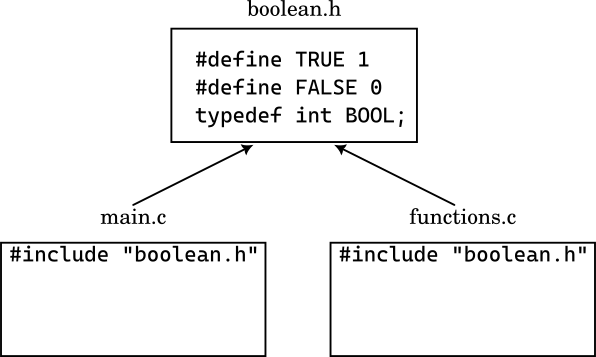
Macro and Type Definitions in Header Files
To share macro and type definitions among multiple source files, it is sufficient to insert such definitions into a header file and include it in the source files that need such definitions.
No particular syntax is necessary.
Inserting macro and type definitions into header files has a series of advantages:
- The definitions do not have to be repeated in every source file;
-
The program becomes easier to modify, since the definitions are concentrated in a single file;
If, for example, we wanted to change the
BOOLtype and make it an alias ofshortinstead ofint, we would just need to change the content of theboolean.hheader file and all source files that includeboolean.hwould be automatically updated. -
Inconsistencies between definitions in various source files are avoided.
Sharing Function Prototypes
We have already analyzed in the introductory lesson on the compilation process that to share a function among multiple source files it is necessary to:
- Define the function in a source file;
- Declare the function prototype in all source files that want to use it before the point where the function is called.
Let's revisit the example of calculating the circle area that we saw in the introductory lesson.
In that case we had defined the circle_area function in a source file circle.c:
/* circle.c */

double circle_area(double radius) {
    return 3.14159 * radius * radius;
}
Then, we had created the source file main.c with the code that called the circle_area function:
/* main.c */
#include <stdio.h>

double circle_area(double radius);

int main() {
    double radius;
    double area;

    printf("Insert the circle radius: ");
    scanf("%lf", &radius);

    area = circle_area(radius);

    printf("The area of the circle with radius %.2f is %.2f\n", radius, area);

    return 0;
}
To make everything work we had to write the prototype of the circle_area function in main.c. Otherwise, the compiler would have given an undefined reference error.
This naïve solution works, but presents some problems:
- If the prototype of the
circle_areafunction changes, we must modify the prototype in all source files that call it; - If the
circle_areafunction is used in many source files, we must repeat the prototype in each of them.
All this would become a maintenance nightmare.
To solve these problems we can use a header file.
In particular, the correct solution is:
- Create a header file,
circle.hthat contains the prototype of thecircle_areafunction; - Include the header file in all source files that call the
circle_areafunction.
Additionally, we include circle.h also in the source file circle.c so that the compiler can check that the prototype of the circle_area function matches the definition.
The new files will be:
/* circle.h */
double circle_area(double radius);
/* circle.c */
#include "circle.h"

double circle_area(double radius) {
    return 3.14159 * radius * radius;
}
/* main.c */
#include <stdio.h>

#include "circle.h"

int main() {
    double radius;
    double area;

    printf("Insert the circle radius: ");
    scanf("%lf", &radius);

    area = circle_area(radius);

    printf("The area of the circle with radius %.2f is %.2f\n", radius, area);

    return 0;
}
The effect will be that shown in the following figure:
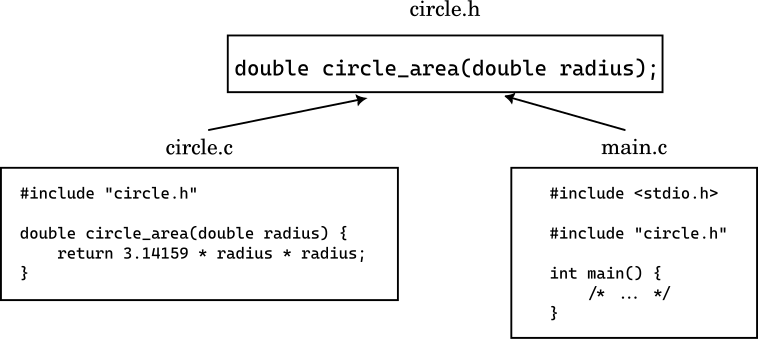
This solution can be expanded. For example, suppose we want to add a function, circle_perimeter, that calculates the perimeter of a circle. We can define the function in circle.c and the prototype in circle.h:
/* circle.h */
double circle_area(double radius);
double circle_perimeter(double radius);
/* circle.c */
#include "circle.h"

double circle_area(double radius) {
    return 3.14159 * radius * radius;
}

double circle_perimeter(double radius) {
    return 2 * 3.14159 * radius;
}
So, summarizing the mechanism:
Sharing Functions through Header Files
To share one or more functions among multiple source files, it is sufficient to:
- Declare the function prototypes in a header file;
- Include the header file in the source file where the functions are defined.
- Include the header file in the source files that call the functions.
Sharing Global Variables
The sharing of global variables happens, more or less, in the same way functions are shared.
To share a function, as we saw above, it is sufficient to insert the definition of the function in a single source file, while the declaration of the function is inserted in a header file. The latter is then included in the source files that call the function.
The sharing of a global variable in C happens in the same way but with a small difference.
So far, in this guide we have not made a difference between declaration and definition of a variable.
To declare, for example, a variable number of type int, it is enough to write:
int number;
With this line of code, we are not only declaring a variable number of type int, but we are also defining the variable, that is we are telling the compiler to reserve space in memory for the variable number.
These two steps can be separated in C language through the use of the extern keyword.
By adding extern at the beginning of the declaration of a variable, we are telling the compiler that we intend to use the variable, but that the definition of the variable is in another source file, that is its memory space is allocated elsewhere.
The extern keyword works with variables of any type. For example, we can apply it to an array and, in that case, it is not necessary to specify the size of the array:
extern int array[];
Since, with this line of code, the compiler does not allocate the necessary space for the array, it is not mandatory to specify its size.
extern Keyword
In C language, the extern keyword placed before the declaration of a variable indicates to the compiler that the variable itself is defined elsewhere, so its memory space is allocated at another point.
The point where the variable is defined can also be in another source file.
To share, therefore, a global variable among multiple source files, first we define the variable in a source file:
int number;
If the variable number must be initialized with a value, we can do it always in the same file:
int number = 42;
When the compiler compiles this source file, it allocates the memory space for the variable number and initializes it with the value 42.
The other files that want to use the variable number must declare it as extern:
extern int number;
After that, each file can access number both in reading and writing. Thanks to the extern keyword, the compiler knows that the variable number is defined at another point and does not need to allocate memory space for it.
Doing so, however, we have a problem. We must ensure that the variable number is defined or declared in the various source files in the same way.
Different Declarations of the Same Variable
What happens if a variable is defined in a source file with one type, while it is declared in another source file with another type with extern?
In such cases the behavior of the program is not defined.
For example, if in a source file we define a variable number of type int:
int number;
But then, in another source file, we declare the variable number as extern but of type double:
extern double number;
The compiler has no way to check that the declaration respects the definition of number. Therefore, the behavior of the program becomes unpredictable.
To avoid problems of this type, we can use a header file.
The solution to this problem consists of:
-
Defining the variable in a source file;
For example, suppose we define the variable
numberin the filenumber.cwhere we also initialize it:/* number.c */ int number = 42; -
Declaring the variable as
externin a header file;We create a header file
number.hwhere we declare the variablenumberasextern:/* number.h */ extern int number;We also include this file in the
number.cfile so that the compiler can check that the declaration respects the definition:/* number.c */ #include "number.h" int number = 42; -
Including the header file in the source files that want to use the variable
number.For example, if we want to use the variable
numberin a source filemain.c, we must include the header filenumber.h:/* main.c */ #include "number.h" int main() { printf("The value of number is %d\n", number); return 0; }
The result is shown in the figure:
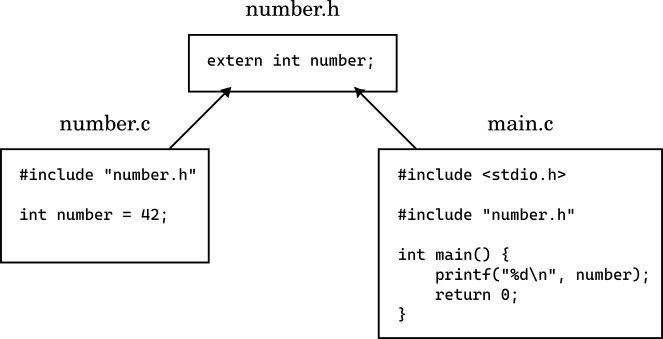
Although sharing global variables is possible, it is good to remember that the use of global variables should be limited to the bare minimum. Global variables can make the code difficult to maintain and test.
Summarizing:
Sharing Global Variables through Header Files
To share a global variable among multiple source files, it is sufficient to:
- Define the variable in a source file;
- Declare the variable as
externin a header file; - Include the header file in the source file where the variable is defined;
- Include the header file in the source files that want to use the variable.
In Summary
In this lesson we have finally seen how to write a header file in C language by studying the three most common cases:
- Sharing macro definitions and types: in this way there is no need to repeat the definitions in every source file;
- Sharing function prototypes: in this way the function prototypes are collected in a single header file;
- Sharing global variables: in this way global variables can be shared among multiple source files but we had to use the
externkeyword.
What we have not yet studied is the possibility of nesting header files. This topic will be covered in the next lesson.