Dynamic Memory Allocation in C
Dynamic memory allocation is a fundamental technique in C language that allows managing memory in a flexible and efficient way. Unlike static variables, which have a fixed size determined at compile time, dynamic allocation allows requesting memory during program execution. This is particularly useful when the amount of memory needed is not known in advance, as in the case of data structures that can grow or shrink in size.
In this lesson, we will explore the main functions provided by the C standard library for dynamic memory allocation: malloc, calloc, realloc and free. We will see how to use these functions to allocate, resize and free memory, avoiding common problems such as memory leaks and dangling pointers.
Allocating memory dynamically
In previous lessons, we studied strings, arrays and data structures in C language.
All these data types normally have a fixed size.
For example, arrays, once declared, cannot change the number of elements they contain. The only way to modify the size is to change the code and recompile.
C99 introduced variable length arrays, but their length is determined at run time and remains fixed for the rest of the time.
Similarly, strings, once declared, cannot change their length. This is because they are effectively arrays of characters.
In short, fixed-length data structures, such as strings, arrays and struct, represent a problem. The developer must predict in advance a maximum size that cannot be modified.
Two cases can then occur:
- The chosen size is too large and memory is wasted;
- The chosen size is too small and there is a risk of overwriting memory.
Let's take, for example, a program that must manage a list of students participating in a course. If it is expected that the course will have a maximum of 100 students, an array of 100 elements could be declared.
However, it could happen that the course has more than 100 students. In this case, the program would not be able to handle the situation. We would have to modify the code and recompile.
In general, therefore, we cannot always be sure of the size of a data structure in advance.
Fortunately, the C language allows us to allocate memory dynamically. This means that we can request the operating system to reserve a certain amount of memory at run time.
Heap
In general, how does the dynamic memory allocation mechanism work in C language?
Previously, we saw that when a process corresponding to a program written in C is executed, the operating system reserves four memory areas for the process, called segments.
We have already studied the first three:
- Text Segment: a fixed size portion of memory that contains the machine code of the program;
- Data Segment: a fixed size portion of memory that contains the global and static variables of the program;
- Stack Segment: a variable size portion of memory that contains the local variables of functions, their arguments and data related to function calls. In other words, it serves to contain the Stack Frames of functions.
A fourth segment remains: the Heap Segment, also called simply the process Heap.
The name Heap comes from English and means pile, heap. This is because, in this segment, variable-size data structures are allocated, which can be seen as a pile of data.
Its size is variable and can grow or shrink during program execution.
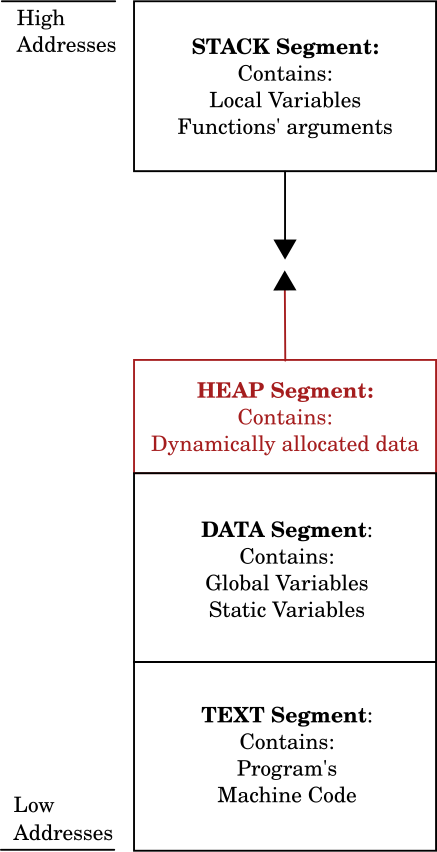
When you want to allocate a data structure on the Heap, you must invoke library functions that allow requesting a certain amount of memory from the operating system.
Heap Segment
The Heap Segment is a variable portion of memory that contains data structures dynamically allocated during program execution.
Data structures allocated on the Heap are accessible from the entire program and their lifetime is independent of the function that allocated them.
The peculiarity of the Heap segment, however, is that unlike variables and data allocated in other segments, the lifetime of data structures allocated on the Heap must be managed manually.
In other words, it is the developer's task to choose when to allocate and, above all, when to release the allocated memory.
This is a fundamental detail. In fact, if we do not free memory that is no longer needed by the program and, in the meantime, we continue to allocate new memory, a phenomenon called memory leak could occur, which leads to the exhaustion of available memory.
Functions for dynamic allocation
Let's now see what are the functions provided by the C standard library for allocating memory.
To use them, you must include the header file <stdlib.h>
Function malloc
The malloc function allows allocating blocks of memory. The name stands for memory allocation.
The function signature is as follows:
#include <stdlib.h>

void *malloc(size_t size);
The malloc function requires as input the number of bytes to allocate and returns a pointer of type void * to the allocated memory.
The data type size_t is, essentially, an unsigned integer capable of representing the size of an object in bytes. In practice, it is an alias for unsigned int or unsigned long.
When obtaining a pointer from the malloc function, you must make an explicit cast to the desired data type, even if the C language does not require it.
Furthermore, the malloc function does not clear the memory. Therefore, the memory we obtain with it could contain garbage data from previous occupations.
Function calloc
The calloc function allows the allocation of contiguous blocks of memory. The name stands for contiguous allocation.
The function signature is as follows:
#include <stdlib.h>

void *calloc(size_t num, size_t size);
The calloc function requires as input the number of elements to allocate and the size of each element in bytes. It returns a pointer of type void * to the allocated memory.
Unlike malloc, the calloc function initializes the allocated memory to zero.
Its use is useful when you want to be sure that the allocated memory is initialized to zero and when you want to allocate arrays of elements or data structures.
Function realloc
The realloc function allows resizing a previously allocated memory block or area. The name stands for reallocation.
The function signature is as follows:
#include <stdlib.h>

void *realloc(void *ptr, size_t size);
The realloc function requires as input a pointer to the memory to be resized and the new size in bytes. It returns a pointer of type void * to the resized memory.
If the allocated memory is sufficient, the realloc function resizes it. Otherwise, it allocates a new memory area, copies the data from the old area to the new one and frees the old area.
If the passed pointer is NULL, the realloc function behaves like malloc and allocates a new memory area.
Of these three functions, the malloc function is the most used because it is faster. The calloc function initializes the allocated memory to zero, an operation that can be avoided if not necessary.
Each of these functions always returns a pointer of type void *. This is because they cannot know in advance what types of data are being allocated.
We will analyze these functions in detail in the next lessons. For now let's study a simple example.
Example of using the malloc function
Let's try to use the malloc function to allocate a memory area of 1024 bytes, that is, one kilobyte.
void *p;

p = malloc(1024);
In this case, p is a pointer of type void * that points to the allocated memory area.
One thing to keep in mind is that when using the malloc function, you must always check if the memory was allocated correctly.
In fact, memory allocation could fail. There are various reasons why this can happen, for example:
- There is not enough available memory; there could be too many active processes in memory and the operating system cannot satisfy the request;
- An attempt was made to allocate too large an amount of memory. Operating systems such as Linux and Windows do not allow a running process to allocate large amounts of memory. This is to prevent a process from monopolizing system memory. The problem can be circumvented by modifying the operating system settings.
Return Value of Memory Allocation Functions
In case of failure, memory allocation functions return a NULL pointer.
In any case, you must always check if the memory was allocated correctly. This operation is simple, since the three functions above, including malloc, return a NULL pointer in case of failure.
void *p;

p = malloc(1024);

/* Check if memory was allocated correctly */
if (p == NULL) {
    printf("Error: memory not allocated\n");
    exit(1);
}
Always check the value returned by memory allocation functions
You must always check if the pointer returned by memory allocation functions is NULL. If it is, it means that the allocation failed and the error must be handled.
Memory deallocation
The malloc function and other memory allocation functions obtain memory from the process Heap.
They could fail, as we have seen, and return a NULL pointer in case of error.
Furthermore, it could happen that the program could allocate memory areas and lose track of them. This phenomenon is called memory leak.
To better understand this problem, consider the following example:
void *p;
void *q;

p = malloc(1024);
q = malloc(2048);

/* ... */

p = q;
In this example, we are allocating two memory blocks. A first of 1024 bytes we assign to pointer p, while a second of 2048 bytes we assign to pointer q.
After the two allocations, the situation in memory is as follows:
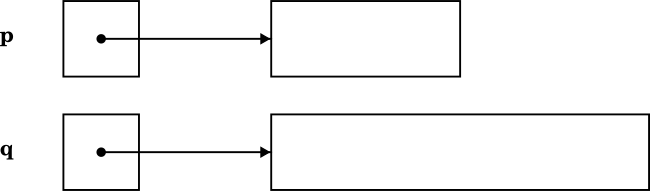
Subsequently, however, we perform an assignment of the value of pointer q to pointer p:
p = q;
Now, both pointers point to the 2048-byte memory area allocated with the second call to malloc:

As you can see, there is no longer any pointer that points to the first memory block of 1024 bytes. From this moment on, the program will no longer be able to access it again. This is an example of memory leak since that memory area is now wasted.
In technical jargon, a memory area or block that is no longer accessible by the program is called garbage. A program that leaves memory areas that are no longer accessible is a program that suffers from memory leak.
Some programming languages, such as Java and C#, provide a mechanism called garbage collector that takes care of detecting and freeing memory areas that are no longer accessible. It is said that these languages provide automatic memory management.
In C it is not so. Rather, every programmer is responsible for recycling their own garbage. In C, memory management is manual.
To do this, you must use the free library function.
The free function
The purpose of the free function is to free memory previously allocated with malloc, calloc or realloc.
It is also defined in the stdlib.h header and has the following prototype:
void free(void *ptr);
Using the free function is very simple. Just pass the pointer to the memory block that is no longer needed.
Returning to the above example, we can solve the memory leak problem as follows:
void *p;
void *q;

p = malloc(1024);
q = malloc(2048);

/* ... */

free(p);
p = q;
The call to the free function before the assignment of q to p frees the 1024-byte memory area. In this way, that memory block is again available for subsequent allocations.
Function free
The free function frees memory previously allocated with malloc, calloc or realloc.
The function prototype is as follows:
#include <stdlib.h>

void free(void *ptr);
The free function requires as input a pointer to the memory to be freed.
When using the free function, however, caution must be exercised.
Attention to the pointer passed to the free function
When using the free function, you must avoid the following three errors that could lead to undefined behavior:
-
Passing a
NULLpointer to thefreefunction. This is undefined behavior;void *p = NULL; /* ERROR: p is NULL */ free(p); -
Passing a pointer not allocated with
malloc,callocorrealloc. In this case too there is undefined behavior;int a = 10; void *p = &a; /* ERROR: p was not allocated with malloc, calloc or realloc */ free(p); -
Passing a pointer already freed with
free. This is a common error that can lead to a program crash.void *p = malloc(1024); free(p); /* ERROR: p has already been freed */ free(p);
Therefore, when using the free function, you must ensure that the passed pointer is valid and has not already been freed.
The Dangling Pointer problem
The free function allows us to free memory allocated with malloc, calloc or realloc and possibly reuse it.
However, its use leads us to a second problem known as Dangling Pointer.
In fact, the free function deallocates the memory pointed to by the pointer passed as an argument, but does not modify the pointer value itself.
If you try to use a pointer that points to a previously freed memory area, you could encounter undefined behavior.
For example:
int *p = malloc(sizeof(int) * 10);

free(p);

/* ERROR: p is a Dangling Pointer */
*p = 10;
In this case, p is a pointer that points to a memory area of 10 integers allocated with malloc. After the call to free, p becomes a Dangling Pointer. Trying to access the memory area pointed to by p causes undefined behavior and could have disastrous consequences.
There is no unique solution to this problem. However, a common practice is to assign the NULL value to the pointer after freeing it. In this way, you can easily test the fact that the pointer is no longer valid.
int *p = malloc(sizeof(int) * 10);

free(p);

p = NULL;
Dangling Pointer
A Dangling Pointer is a pointer that points to a memory area previously freed through the free function.
The use of a dangling pointer can lead to undefined behavior and program crashes.
Conclusion
In this lesson we introduced the concept of dynamic memory allocation in C language.
In particular we studied that:
- The C language allows allocating memory dynamically through the
malloc,callocandreallocfunctions; - Dynamically allocated memory is obtained from the process Heap Segment;
- The lifetime of dynamically allocated data structures must be managed manually;
- The
freefunction allows freeing previously allocated memory; - Care must be taken not to create memory leaks and not to use dangling pointers.
In the next lesson we will see how to exploit the functions introduced in this lesson to dynamically allocate strings.