Dynamic String Allocation in C
Let's apply dynamic memory allocation to work with strings in C language.
Strings lend themselves well to being allocated dynamically since it's not always possible to predict their length in advance. In this lesson, we will see how to dynamically allocate a string, how to initialize it, how to deallocate it, and how to create functions that return dynamically allocated strings.
Strings and Dynamic Allocation
Dynamic memory allocation is very useful when we need to work with strings in programs written in C.
Strings, in fact, in C language are nothing more than arrays of char characters. However, it's not easy to anticipate during program development how long these arrays should be. If we choose to use statically allocated arrays, we must provide a maximum possible length. However, this is not the optimal choice. First, because choosing a length that's too large wastes memory, and second because the case might occur where the string is longer than expected, causing a buffer overflow.
By allocating strings dynamically, we are postponing the choice of array length, and we can decide the string length during program execution based on needs.
Using the malloc function to allocate a string
In the previous lesson, we saw that the malloc function allows us to dynamically allocate a block or area of memory.
Its prototype is as follows:
#include <stdlib.h>

void *malloc(size_t size);
The function takes as input a size specified by the size parameter which is expressed in bytes. It returns a void * pointer to the allocated memory block. In case the function fails to allocate the requested memory, it will return the NULL value.
Using malloc to allocate a string is very simple. In fact, the C language standard requires that the size of a char be exactly one byte. In other words:
1 == sizeof(char)
Therefore, if we want to allocate a string of n characters, we must write the following code:
char *string = NULL;

string = (char *) malloc(n + 1);
Note that, when invoking malloc, we passed the value n + 1 as an argument instead of n, since we must allocate one extra byte for the string terminator character, namely the '\0' character.
In the code above we inserted an explicit cast to type char *. Actually, the C standard doesn't require an explicit cast, but it's a common practice to avoid compiler warnings. Furthermore, in C++ the cast is mandatory, so if moving from C to C++ it's good to get used to this practice.
Another good practice, as we already said in the previous lesson, is to always check if malloc returned NULL. If malloc returns NULL, it means it failed to allocate the requested memory. In this case, it's good practice to terminate the program or handle the error appropriately.
if (string == NULL) {
    printf("Error: unable to allocate the requested memory\n");
    exit(EXIT_FAILURE);
}
To summarize:
Procedure to allocate a string dynamically in C language
To allocate a string dynamically in C language, the typical code to use is the following:
1 2 3 4 5 6 7 8 9 10 11 12 | |
Where:
- You must include the
stdlib.hheader file to be able to use themallocfunction; stringis a character pointer that points to the allocated memory area;nis the size of the string to allocate;- At line 5,
mallocis invoked passingn + 1as an argument to allocate one extra byte for the string terminator character; - The return value of
mallocis converted through an explicit cast to typechar *and assigned tostring; - At line 7, we check if
mallocreturnedNULL. In this case, an error message is printed and the program is terminated (or the error is handled appropriately).
Once the string is allocated, it can be used like any other string in C. For example, you can copy a string into another, you can concatenate a string to another, you can print the string to screen, etc.
Obviously, when you no longer need it, it's good practice to deallocate the used memory. To deallocate the memory of a dynamically allocated string, you can use the free function.
In this case, deallocation is very simple. Just invoke the free function on the string pointer:
free(string);
Deallocating a dynamically allocated string in C language
To deallocate a dynamically allocated string, just invoke the free function passing the string pointer as an argument:
free(string);
Initialization of a dynamically allocated string
The malloc function doesn't initialize the memory it allocates. Therefore, when we dynamically allocate a string, the string content is undefined. In other words, we cannot know what's inside the string.
Returning to the code above, the string pointer will point to an uninitialized array of n + 1 characters:
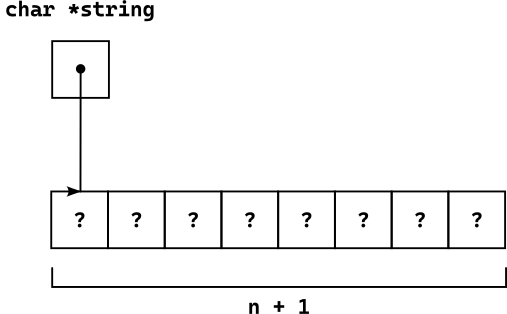
A simple way to initialize a dynamically allocated string is to use the strcpy function to copy a string literal into it.
For example, wanting to initialize the string with the word "hello", we can write:
#include <string.h>

/* ... */

strcpy(string, "hello");
Now, the first five characters of the array will be:
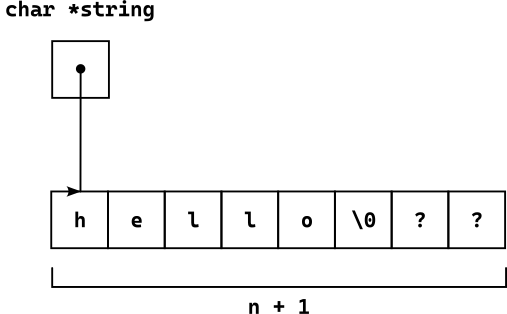
Initializing a dynamically allocated string in C language
To initialize a dynamically allocated string, you can use the strcpy function to copy a string literal into it:
#include <string.h>

/* ... */

strcpy(string, "initialization string");
Example of Dynamic String Allocation
Below, we show a complete example of dynamic string allocation in C language:
1 2 3 4 5 6 7 8 9 10 11 12 13 14 15 16 17 18 19 20 21 22 23 24 25 26 27 28 29 30 31 32 33 34 35 36 37 38 39 40 41 42 43 44 45 | |
The program asks the user to enter the length of the string to allocate. Subsequently, it dynamically allocates the string and asks the user to enter the string. Finally, it prints the dynamically allocated string and deallocates the memory.
To read the string, we defined a read_line function very similar to the one we showed in the lesson on reading strings from console.
Functions and Dynamically Allocated Strings
Through dynamic allocation, we can create functions that create and return dynamically allocated strings. That is, functions that return new strings that didn't exist before the function invocation itself.
Let's try, for example, to create a function that takes two strings as input and returns a new string that is the concatenation of the two.
The C standard library provides the strcat function we've already seen, but it works differently: it modifies the starting string by adding the second string passed. We want to create a function that returns a new string.
To do this, we must dynamically allocate a new string, copy the two strings into it, and return the pointer to the new string.
1 2 3 4 5 6 7 8 9 10 11 12 13 14 15 16 17 18 19 20 21 22 23 24 25 26 27 28 29 30 | |
The concatenate_strings function takes two strings as input and proceeds as follows:
- It calculates the length of the first string
s1and stores it inn1, and the length of the second strings2and stores it inn2; to do this it relies on thestrlenlibrary function; - It dynamically allocates a new string
new_stringof sizen1 + n2 + 1(because we must allocate one extra byte for the string terminator character); to do this, it uses themallocfunction; - It checks if malloc was successful; otherwise, it returns
NULL; - It copies the first string
s1into the new stringnew_stringusing thestrcpyfunction; - It concatenates the second string
s2to the new stringnew_stringusing thestrcatfunction; - It returns the pointer to the new string.
Below, we show an example of using the concatenate_strings function:
1 2 3 4 5 6 7 8 9 10 11 12 13 14 15 16 17 18 19 20 21 | |
The program defines two strings s1 and s2, and invokes the concatenate_strings function.
A fundamental detail is that the concatenate_strings function returns a pointer to a dynamically allocated string. Therefore, it's necessary to deallocate the memory used by the returned string by invoking the free function.
Dynamically allocated strings returned by functions
When a function returns a dynamically allocated string, it's necessary to deallocate the memory used by the string by invoking the free function.
Conclusions
In this lesson we applied dynamic memory allocation to work with strings.
The key concepts we learned are:
- Dynamic string allocation in C allows us to postpone the choice of string length;
- To dynamically allocate a string, we must use the
mallocfunction and pass the string size plus one as an argument; this is because we must allocate one extra byte for the string terminator character; - It's good practice to check if
mallocreturnedNULLand handle the error appropriately; - To deallocate the memory used by a dynamically allocated string, we can use the
freefunction; - To initialize a dynamically allocated string, we can use the
strcpyfunction; - We can create functions that return dynamically allocated strings.
Furthermore, we showed a complete example of dynamic string allocation and how to create a function that returns a new string that is the concatenation of two strings.
In the next lesson we will focus on dynamic array allocation. Strings are character arrays, but we can also dynamically allocate arrays of other data types.