Format Specifiers for Input in C
The input functions of the scanf family (scanf, fscanf, sscanf, etc.) resemble the output functions of the printf family. Both families use format specifiers to indicate the type of data to read or write.
However, this similarity can be misleading, because the operation is different. It is convenient to think of the functions of the scanf family as pattern-matching functions: they compare the characters read from the input with the specified format and, when they find a match, convert the read data into the appropriate data type and store them in the indicated variables.
In this way, the format strings passed in input represent patterns that such functions try to match to the data read from the input.
In this lesson we will focus on the operation of format specifiers for input in C language.
- The input functions of the
scanffamily use format strings to specify the type of data to read. - The format strings for input can contain format specifiers, whitespace characters and non-whitespace characters.
- The format specifiers for input have a structure composed of a percent character
%, an optional assignment suppressor*, an optional maximum field width, an optional size modifier and a conversion character. - The type specifiers for input indicate the type of data to read and include options for integers, floating point numbers, characters, strings and scansets.
- Scansets allow you to define sets of characters to read or to exclude from the input.
Format Strings for Input Functions
We have seen that all the input functions of the scanf family accept in input a format string that specifies the type of data to read.
All these functions, scanf, fscanf, sscanf, etc., work, basically, in this way:
- The function searches for the pattern within the input;
- In the case where the input does not match the pattern, the function returns as soon as it detects the non-match;
- The first character that does not match the pattern is put back into the input (push-back); this means that it will be reread by future operations or input functions.
A format string for input functions can contain the following elements:
-
Format Specifiers:
The format specifiers within the format string for input functions resemble those used in output functions (
printffamily). Most of them skip and ignore the whitespace characters (spaces, tabs, newlines) that are found before the data to read.However, they do not consume (i.e., do not read) the whitespace characters that are found after the read data. These characters remain in the input and can be read by future operations or input functions.
For example, suppose we want to read an integer number. So we must use the format specifier
%d. If the input is the following (where we used the special character␣to represent empty spaces):␣␣␣42␣␣␣The input function will skip the initial empty spaces and read the number
42. However, the empty spaces that follow the number will remain in the input and can be read later.This also applies if at the end of the read data there is a newline character (
\n), which is also considered a whitespace character. So, the next reading of the input could read that newline character. -
Whitespace Characters:
A whitespace character (space, tab, newline) within the format string for input functions matches one or more whitespace characters in the input. In other words, if there is a space in the format string, the input function will skip all the whitespace characters present in the input until it encounters a non-whitespace character. This also applies if there are none.
-
Non-Whitespace Characters:
A non-whitespace character (for example, a letter or a number) within the format string for input functions must match exactly an identical non-whitespace character in the input. If there is a discrepancy, the input function will stop and return the number of elements read up to that moment.
To clarify these concepts better, let's consider a practical example. Suppose we want to read from the input an ISBN code of a book.
The ISBN code (International Standard Book Number) is a unique numerical identifier for books, composed of 13 digits divided into groups separated by hyphens. An example of an ISBN code is the following:
ISBN 123-4-56-789012-3
To read this ISBN code from the input, we can use the following format string:
"ISBN %d-%d-%d-%d-%d"
In this format string:
ISBN: The charactersI,S,B,Nmust match exactly the characters in the input.- After
ISBN, there is a space, which matches one or more whitespace characters in the input. %d: This format specifier indicates that we must read an integer number.-: The hyphen must match exactly the character-in the input.- This pattern repeats for the other groups of digits.
Format Specifiers for Input
The format specifiers for input in C language are slightly simpler compared to those for output.
The general structure of a format specifier for input is the following:
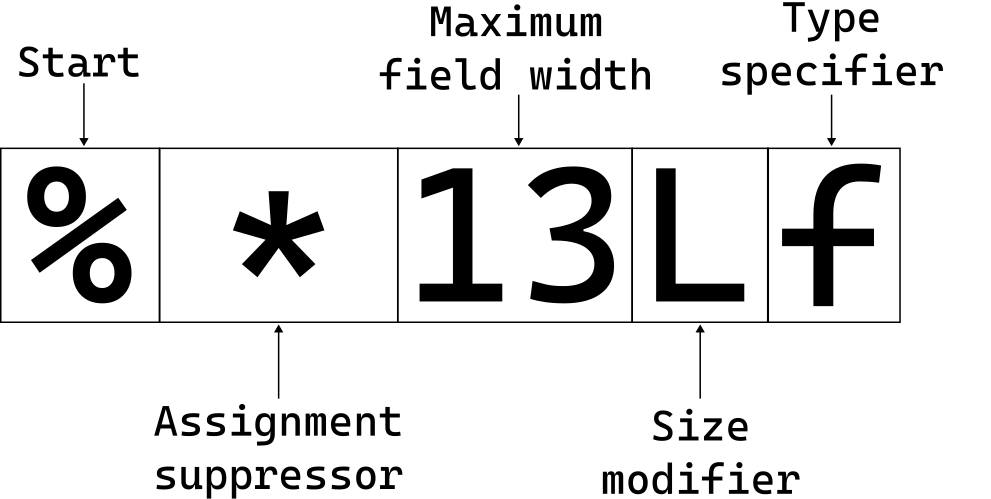
It is a structure composed of:
- A percent character
%, which indicates the beginning of the format specifier. - An optional asterisk
*, which indicates that the read data must not be stored in a variable. - An optional maximum field width, which specifies the maximum number of characters to read.
- An optional size modifier, which indicates the size of the data type to read (for example,
lforlong,hforshort, etc.). - A conversion character, which indicates the type of data to read (for example,
dfor decimal integers,ffor floating point numbers,sfor strings, etc.).
Let's analyze the components of this structure in detail.
Assignment Suppressor (*)
The assignment suppressor * is an optional component of the format specifier for input. When used, it tells the input function to read the corresponding data but not to store it in any variable. This can be useful when you want to ignore certain data in the input.
Furthermore, and this is an important detail, the use of the assignment suppressor * does not affect the count of the number of elements read that the input function returns. In other words, in the final count, the elements read with the assignment suppressor * are not considered.
Maximum Field Width
The maximum field width field is an optional component of the format specifier for input. It allows you to specify the maximum number of characters to read for a particular data.
When a maximum field width is specified, the input function works in this way:
- It ignores all initial whitespaces (spaces, tabs, newlines) without counting them in the field width limit.
- It starts reading the characters until it reaches the specified field width limit or until it encounters a character not valid for the data type in question.
Size Modifiers
The size modifiers are optional components of the format specifier for input that allow you to modify the size of the data type to read. They are useful when working with data types of different sizes, such as short, long, long long, etc.
The following table reports all the size modifiers available for format specifiers for input in C language:
| Size Modifier | Type Specifiers | Corresponding Data Type |
|---|---|---|
hh |
d, i |
signed char * |
hh |
u, o, x, X, n |
unsigned char * |
h |
d, i |
short int * |
h |
u, o, x, X, n |
unsigned short int * |
l |
d, i |
long int * |
l |
u, o, x, X |
unsigned long int * |
l |
f, e, E, g, G, a, A |
double * |
l |
c, s, [ |
wchar_t * |
ll |
d, i |
long long int * |
ll |
u, o, x, X, n |
unsigned long long int * |
j |
d, i |
intmax_t * |
j |
u, o, x, X, n |
uintmax_t * |
z |
d, i, u, o, x, X, n |
size_t * |
t |
d, i, u, o, x, X, n |
ptrdiff_t * |
L |
f, e, E, g, G, a, A |
long double * |
Type Specifiers
The type specifiers are mandatory components of the format specifier for input that indicate the type of data to read. They determine how the input function interprets the characters read from the input and into which data type it converts them.
Below is the complete table of type specifiers for input in C language, together with the corresponding data types:
| Type Specifier | Corresponding Data Type | Description |
|---|---|---|
d |
int * |
Matches a signed decimal integer. |
i |
int * |
Matches an integer; however, depending on the prefix, it can be interpreted as decimal, octal or hexadecimal. If it starts with 0, it is octal; if it starts with 0x or 0X, it is hexadecimal; otherwise, it is decimal. |
o |
unsigned int * |
Matches an unsigned octal integer. |
u |
unsigned int * |
Matches an unsigned decimal integer. |
x, X |
unsigned int * |
Matches an unsigned hexadecimal integer. Does not distinguish between uppercase and lowercase. |
f, F, e, E, g, G, a, A |
float * |
Matches a single-precision floating point number. With this specifier, you can also enter the values NaN and Infinity. |
c |
char * |
Matches n characters, where n is the specified field width (or 1 if not specified). Does not ignore whitespaces and, furthermore, does not add the null termination character (\0) at the end. Expects a pointer to a character array of sufficient size to contain the read characters. |
s |
char * |
Matches a string of characters composed of non-whitespace characters. Ignores initial whitespaces and adds the null termination character (\0) at the end of the read string. Expects a pointer to a character array of sufficient size to contain the read string. |
[ |
char * |
Matches a sequence of characters that belong to a scanset (scan set) specified between square brackets (see below). Adds the null termination character (\0) at the end of the read string. Expects a pointer to a character array of sufficient size to contain the read string. |
p |
void ** |
Matches a pointer stored in hexadecimal format. |
n |
int * |
Does not match any input. Instead, it stores the number of characters read up to that moment in the corresponding argument. Furthermore, it does not increment the count of the number of elements read returned by the input function. |
% |
N/A | Matches the character % in the input. Does not consume any data and does not increment the count of the number of elements read returned by the input function. |
An important detail to keep in mind is that all numerical values can start with a positive sign (+) or negative (-), even in the case of unsigned type specifiers (u, o, x, X). However, if you enter a negative sign with one of these specifiers, the number will be interpreted as a very large value, since it will be treated as an unsigned number.
Attention to matching type specifiers with variables of the correct type
In the case of functions of the scanf family (fscanf, sscanf etc.) it is even more important (compared to functions of the printf family) to match type specifiers to variables of the correct type.
Otherwise, since such functions require the addresses of the passed arguments, the result is undefined and could cause the program to crash.
Scansets
Now, let's delve into a particular type specifier for input that we only mentioned earlier: the type specifier [ (scanset).
It is a more complex and more flexible specifier than the type specifier s (string). In fact, with the scanset it is possible to define a set of characters that you want to read from the input.
This type specifier has two main forms:
%[set]%[^set]
In this case, set represents a series of characters enclosed in square brackets. This type specifier works in this way:
%[set]: Reads a sequence of characters from the input that belong to the specified set. The reading continues until a character that does not belong to the set is encountered.%[^set]: Reads a sequence of characters from the input that do not belong to the specified set. The reading continues until a character that belongs to the set is encountered.
Let's clarify with some practical examples.
Suppose we want to read a string of characters composed only of the letters a, b and c. We can use the following type specifier:
char str[100];
scanf("%[abc]", str);
Now, if we pass in input the string abacabadab, the input function will read only the characters abacaba and will stop when it encounters the character d, which does not belong to the specified set.
The set of characters can also be negated. For example, suppose we want to read a string of characters that does not contain the letters x, y and z. We can use the following type specifier:
char str[100];
scanf("%[^xyz]", str);
In this case, if we pass in input the string helloworldxyz, the input function will read only the characters helloworld and will stop when it encounters the character x, which belongs to the negated set.
Another interesting aspect of scansets is that it is possible to specify character ranges using the hyphen -. Although it is a non-standard extension of the C language, many compilers support it. For example, to read all lowercase letters of the alphabet, we can use the following type specifier:
char str[100];
scanf("%[a-z]", str);
When using the hyphen, however, you must be careful to position it correctly. In fact:
- If the hyphen is at the beginning or end of the set, it is interpreted as a normal character.
- If the hyphen is between two characters, it is interpreted as a range of characters.
So, for example, to read all lowercase letters and the character -, we can use the following type specifier:
char str[100];
scanf("%[-a-z]", str);
Let's see another example where we want to read a string of characters that contains only numerical digits. We can use the following type specifier:
char str[100];
scanf("%[0-9]", str);
The last detail concerning scansets is that, to include the character ] in the set, it must be positioned as the first character after the symbol ^ (if present) or as the first character of the set. For example:
char str[100];
scanf("%[]abc]", str);  // Includes ']' in the set
scanf("%[^]abc]", str); // Includes ']' in the negated set
Otherwise, the character ] will be interpreted as the end of the set.
Examples
Let's conclude this lesson with some examples of application of format specifiers. To make the behavior clearer we will use the character
Example 1
n = scanf("%d%d", &a, &b);
with input
Result:
n=1
a=42
b not modified
In blue is highlighted the input that was actually read by the scanf function.
The first integer is read correctly, but the function stops at the character , which does not match the format specifier %d.
Example 2
n = scanf("%d,%d", &a, &b);
with input:
Result:
n=1
a=42
b not modified
The first integer is read correctly, but the function stops at the whitespace character after the comma, which does not match the character , in the format specifier.
Example 3
n = scanf("%d ,%d", &a, &b);
with input:
Result:
n=2
a=42
b=73
Both integers are read correctly, since the space in the format specifier allows to skip the whitespace characters in the input.
Example 4
n = scanf("%*d%d", &a);
with input:
Result:
n=1
a=34
The first integer is read but not stored due to the assignment suppressor *. The second integer is read and stored in the variable a.
Example 5
n = scanf("%*s%s", str);
with input:
Result:
n=1
str="how"
The first string is read but not stored due to the assignment suppressor *. The second string is read and stored in the variable str. Note that whitespace characters are considered as string terminators.
Example 6
n = scanf("%1d%2d%3d", &a, &b, &c);
with input:
Result:
n=3
a=1
b=23
c=45
The first integer is read with a field width of 1, so it will be 1. The second integer is read with a field width of 2, so it will be 23. The third integer is read with a field width of 3, but since there are only two remaining digits (45), only 45 will be read.
Example 7
n = scanf("%2d%2s%2d", &a, str, &c);
with input:
Result:
n=3
a=12
str="34"
c=56
The first integer is read with a field width of 2, so it will be 12. The string is read with a field width of 2, so it will contain the characters "34". The second integer is read with a field width of 2, so it will be 56.
Example 8
n = scanf("%i%i%i", &a, &b, &c);
with input:
Result:
n=3
a=12
b=28
c=86
The type specifier %i interprets the first number as decimal (12), the second as octal (034 which is 28 in decimal) and the third as hexadecimal (0x56 which is 86 in decimal). When a number starts with 0, it is interpreted as octal, and when it starts with 0x or 0X, it is interpreted as hexadecimal. But anyway, all numbers are stored as integer values in the corresponding variables.
Example 9
n = scanf("%[0123456789]", str);
with input:
Result:
n=1
str="123"
The string is read until a character that does not belong to the specified set is encountered (in this case, the digits from 0 to 9). Therefore, the reading stops at the character a.
Example 10
n = scanf("%[^0123456789]", str);
with input:
Result:
n=1
str="abcd"
The string is read until a character that belongs to the specified set is encountered (in this case, the digits from 0 to 9). Therefore, the reading stops at the character 1.
Example 11
n = scanf("%*d%d%n", &a, &b);
with input:
Result:
n=1
a=34
b=5
In this example, the first integer, 12, is discarded due to the assignment suppressor: %*d. In the variable a will be stored the second integer, 34. At this point, the specifier %n is used which stores the number of characters read so far in the variable b, that is the value 5.