Format Specifiers for Output in C
The C language standard library provides a whole series of functions for formatted output that belong to the printf family of functions. These functions are: printf, fprintf, sprintf, snprintf, and vprintf.
In previous lessons we have seen how to use the printf function to print values of various data types, such as integers, floating-point numbers, and character strings. We have also studied fprintf for writing to files and sprintf for writing to strings.
All these functions have similar behavior and share the same mechanism for specifying the output format of data. This mechanism is based on the use of format specifiers within the format string passed as the first argument to formatted output functions.
So far, as we have encountered new data types, we have seen the corresponding format specifiers. In this lesson, however, we will study them in a systematic and complete way.
- Format specifiers are character sequences that indicate how a value should be converted into a textual representation during formatted output.
- The structure of a format specifier includes: an initial character
%, optional flags, an optional minimum field width, an optional precision, optional size modifiers, and a mandatory type specifier. - Flags modify the appearance of the output, the minimum field width specifies the minimum number of characters to use, precision varies depending on the data type, and size modifiers change the size of the data type.
- Type specifiers indicate the data type being printed and determine how the value should be converted into a textual representation.
Structure of a Format Specifier
Any of the formatted output functions of the printf family accepts as its first argument a format string.
When such functions process the string, they essentially output the characters of the string itself, one after the other. Normal characters are printed as they are, while escape sequences are interpreted and replaced with the corresponding character (for example, \n is replaced with a newline character).
Conversely, when the function encounters a format specifier, it takes the corresponding value from the list of arguments passed to the function and converts it into a textual representation according to the rules defined by the format specifier itself.
A format specifier has the following general structure:
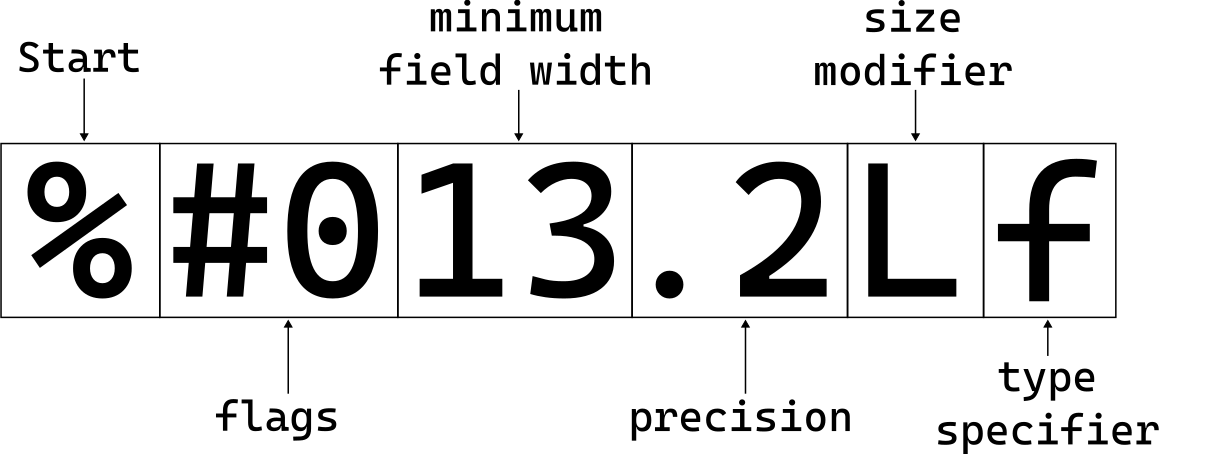
As can be seen, a format specifier always starts with the character % and is composed of several optional parts and one mandatory part. Let's study them in detail.
Format Specifier Flags
Flags are optional characters that modify the appearance of the output. A format specifier can contain zero or more flags, which must be positioned immediately after the % character.
The flags are as follows:
| Flag | Description |
|---|---|
- |
Left-aligns the value within the specified field width. By default, values are right-aligned. |
+ |
Forces the display of the + sign for positive numbers and the - sign for negative numbers. By default, only negative numbers show the - sign. |
| (space) | Inserts a space before positive numbers if the + sign is not present. |
# |
Modifies the output format for some data types. For octal numbers, adds the prefix 0 (zero). For hexadecimal numbers, adds the prefix 0x or 0X. For floating-point numbers, forces the display of the decimal point even if there are no decimal digits. For the %g or %G specifier, prevents the removal of trailing zeros. |
0 |
Fills the specified field width with leading zeros instead of spaces. This flag is ignored if the - flag is present. Additionally, this flag is ignored for the d, i, o, u, x, X specifiers or if precision is specified. |
Minimum Field Width
The minimum field width is an optional integer that specifies the minimum number of characters to use to represent the output value.
Its behavior is as follows:
- If the number of characters needed to represent the value is less than the specified minimum width, the remaining space is filled with spaces (or zeros, if the
0flag is present). - If the number of characters needed to represent the value is greater than or equal to the specified minimum width, the value is printed normally without any padding.
To specify the minimum field width, insert a positive integer immediately after the flags (if present) in the format specifier.
You can also use an asterisk (*) instead of an integer to indicate that the minimum field width will be specified as an additional argument to the formatted output function. In this case, the corresponding argument must be of type int and must precede the value to be printed in the argument list. For example:
printf("%*d", 5, 42);
In this example, the minimum field width is specified as 5, so the number 42 will be printed with three leading spaces to reach a total width of five characters.
Precision
Precision is an optional integer always preceded by a dot (.).
Its meaning varies depending on the data type being printed:
| Data Type | Type Specifiers | Meaning of Precision |
|---|---|---|
| Integers | d, i, o, u, x, X |
Minimum number of digits to print. If the number has fewer digits, it is filled with leading zeros. |
| Floating-point numbers in decimal or scientific notation | A, a, E, e, F, f |
Number of digits to print after the decimal point. The default value is 6. If precision is 0, no decimal point is printed. |
| Floating-point numbers in compact notation | G, g |
Maximum number of significant digits to print. The default value is 6. If precision is 0, it is considered as 1. |
| Character strings | s |
Maximum number of characters to print from the string. If the string is longer, it is truncated. |
| Pointers | p |
No effect. Precision is ignored. |
Again, instead of specifying an integer, you can use an asterisk (*) to indicate that the precision will be specified as an additional argument to the formatted output function. The corresponding argument must be of type int and must precede the value to be printed in the argument list. For example:
printf("%.*f", 2, 3.14159);
In this example, the precision is specified as 2, so the number 3.14159 will be printed as 3.14, with two digits after the decimal point.
If, instead, the integer specifying the precision is absent, the default value 0 is assumed.
Size Modifiers
Size modifiers are optional character sequences that modify the size of the data type being printed.
In other words, if we specify, for example, an integer with the %d specifier, the compiler expects an argument of type int. However, if we use a size modifier like l (lowercase L), the specifier becomes %ld and the compiler expects an argument of type long int. Similarly, with the h (lowercase H) modifier, the specifier becomes %hd and the compiler expects an argument of type short int.
The following table lists the size modifiers, associations with type specifiers, and their meaning:
| Size Modifier | Type Specifiers | Meaning |
|---|---|---|
hh |
d, i |
signed char |
hh |
o, u, x, X |
unsigned char |
hh |
n |
signed char * |
h |
d, i |
short int |
h |
o, u, x, X |
unsigned short int |
h |
n |
short int * |
l |
d, i |
long int |
l |
o, u, x, X |
unsigned long int |
l |
n |
long int * |
l |
c |
wint_t |
l |
s |
wchar_t * |
l |
A, a, E, e, F, f, G, g |
No effect |
ll |
d, i |
long long int |
ll |
o, u, x, X |
unsigned long long int |
ll |
n |
long long int * |
j |
d, i |
intmax_t |
j |
o, u, x, X |
uintmax_t |
j |
n |
intmax_t * |
z |
d, i |
size_t |
z |
o, u, x, X |
size_t |
z |
n |
size_t * |
t |
d, i |
ptrdiff_t |
t |
o, u, x, X |
ptrdiff_t |
t |
n |
ptrdiff_t * |
L |
A, a, E, e, F, f, G, g |
long double |
Type Specifier
The type specifier is the last part of a format specifier and is mandatory.
The type specifier indicates the data type being printed and determines how the value should be converted into a textual representation.
The following table lists all available type specifiers, along with the corresponding data type and a brief description of their usage:
| Type Specifier | Corresponding Data Type | Description |
|---|---|---|
d, i |
int |
Prints a signed integer in decimal base. |
o |
unsigned int |
Prints an unsigned integer in octal base. |
u |
unsigned int |
Prints an unsigned integer in decimal base. |
x, X |
unsigned int |
Prints an unsigned integer in hexadecimal base (lowercase for x, uppercase for X). |
f, F |
double |
Prints a floating-point number in decimal notation. If precision is not specified, shows 6 digits after the decimal point. |
e, E |
double |
Prints a floating-point number in scientific notation. If precision is not specified, shows 6 digits after the decimal point. When e is used, the exponent is preceded by the letter e; when E is used, the exponent is preceded by the letter E. |
g, G |
double |
Prints a floating-point number using the f or e format. If the exponent is less than -4 or greater than or equal to the precision, the e format is used; otherwise, the f format is used. Precision specifies the maximum number of significant digits to print. When g is used, exponent letters are lowercase; when G is used, exponent letters are uppercase. Additionally, this format does not show non-significant trailing zeros unless the # flag is specified. |
a, A |
double |
Prints a floating-point number in hexadecimal notation. In practice, the number is represented as [-]0xh.hhhhp±d, where [-] is the optional minus sign, 0x is the hexadecimal prefix, h.hhhh is the fractional part in hexadecimal, p indicates the start of the exponent in base 2, and ±d is the exponent in base 10. When a is used, hexadecimal letters are lowercase; when A is used, hexadecimal letters are uppercase. If precision is not specified, shows 13 digits after the decimal point. |
c |
unsigned int |
Prints an integer as a single ASCII character. |
s |
char * |
Prints a character string pointed to by the argument. Stops printing when it encounters the null character (\0) or when it reaches the specified precision. |
p |
void * |
Prints a pointer as a hexadecimal address. |
n |
int * |
Produces no output. Instead, stores the number of characters printed so far in the pointed argument, which must be of type pointer to integer. |
% |
N/A | Prints the % character. Does not require any corresponding argument. |
Why There Is No Output Format Specifier for the float Type?
If we carefully observe Table 3, which collects all type specifiers supported by the C language, and observe Table 2, which shows the length modifiers, we can notice that there is no way to tell the printf function to print a float value.
We can, in fact, print double values with the specifiers f, F, e, E, g, G, a, and A. We can also print long double values by placing the L modifier before the previously seen specifiers. But there is no way to print float values.
The question naturally arises: why can't we?
The answer derives from two technical reasons:
-
First of all, functions of the
printffamily are functions that accept a variable number of arguments.When using functions that have a variable number of arguments, the compiler, although it knows the function prototype, does not and cannot know in advance the type of the arguments passed. Which brings us to the second reason.
-
Not knowing the type of the arguments passed, the compiler performs automatic type promotion as it would in the case of functions whose prototype it does not know.
We have seen that in the C89 standard it is not an error to call a function whose prototype the compiler does not know or that has not been previously defined. Only in this case, the compiler performs automatic type conversions. Such as, for example, converting any
floatvalue todouble.Starting from the C99 standard, calling a function without the compiler knowing its definition or prototype is an error.
However, functions with a variable number of arguments are in a sort of gray area, since the compiler knows a partial prototype.
This is why, when we pass a
floatto aprintffunction, which is a function with a variable number of arguments, it will always be converted to adoublebefore being passed to the function.
The consequence of points 1 and 2 is that a special specifier for the float type is not necessary.
The Difference Between the f and F Specifiers
We have seen that there are two type specifiers for printing floating-point numbers in decimal notation: f and F.
These two specifiers display decimal numbers using a number of decimal digits that depends on the specified precision (or the default value of 6 decimal digits if precision is not specified).
Although both specifiers produce the same output for normal numbers, the difference between f and F manifests itself when printing special values such as NaN (Not a Number) and Infinity.
The difference arises from the fact that most processors and mathematical libraries use the IEEE 754 representation for floating-point numbers. This standard allows floating-point operations to produce special results: infinity, negative infinity, and NaN (Not a Number).
For example, if we divide a positive double number by zero, the result will be Infinity. If we divide a negative double number by zero, the result will be -Infinity. If we perform an undefined mathematical operation, such as dividing zero by zero, the result will be NaN since the result of such an operation is not mathematically defined.
Starting from the C99 standard, the f and F specifiers handle these special values differently:
- The
fspecifier printsnanforNaN,infforInfinity, and-inffor-Infinity, using lowercase letters. - The
Fspecifier printsNANforNaN,INFforInfinity, and-INFfor-Infinity, using uppercase letters.
This difference can be important in contexts where the distinction between uppercase and lowercase letters is significant, such as in log files or scientific reports.
The e, E, g, and G specifiers also follow the same convention for handling NaN and Infinity.
Examples of Format Specifiers
Now that we have seen the structure of a format specifier in detail, let's see some practical examples of complete format specifiers.
In showing the output of each example, we will use the character ␣ to represent an empty space, in order to make the effect of flags and minimum field width clearer.
As a first example, consider printing two integers, 123 and -456, using the %d format specifier but applying different flags and minimum field widths:
| Format Specifier | Application to 123 |
Application to -456 |
|---|---|---|
%d |
123 |
-456 |
%8d |
␣␣␣␣␣123 |
␣␣␣␣-456 |
%-8d |
123␣␣␣␣␣ |
-456␣␣␣␣ |
%+8d |
␣␣␣␣+123 |
␣␣␣␣-456 |
% 8d |
␣␣␣␣␣123 |
␣␣␣␣-456 |
%08d |
00000123 |
-0000456 |
%-+8d |
+123␣␣␣␣ |
-456␣␣␣␣ |
%+08d |
+0000123 |
-0000456 |
% 08d |
␣0000123 |
-0000456 |
Now let's move to an example still with integers, but this time we display them in different number bases using the %o, %x, and %X format specifiers, also including the # flag to show the appropriate prefixes:
| Format Specifier | Application to 123 |
|---|---|
%o |
173 |
%#o |
0173 |
%x |
7b |
%#x |
0x7b |
%X |
7B |
%#X |
0X7B |
%8x |
␣␣␣␣␣7b |
%#8x |
␣␣␣0x7b |
For other examples, we refer to the lessons on integers and floating-point numbers, where numerous examples of format specifiers applied to such data types are shown.
Let's see, however, some examples of format specifiers applied to character strings. Suppose we have the string "Hello" and the string "Automobile" and we want to print them with different format specifiers:
| Format Specifier | Application to "Hello" |
Application to "Automobile" |
|---|---|---|
%s |
Hello |
Automobile |
%12s |
␣␣␣␣␣␣␣Hello |
␣␣Automobile |
%-12s |
Hello␣␣␣␣␣␣␣ |
Automobile␣␣ |
%.3s |
Hel |
Aut |
%12.3s |
␣␣␣␣␣␣␣␣␣Hel |
␣␣␣␣␣␣␣␣␣Aut |
%-12.3s |
Hel␣␣␣␣␣␣␣␣␣ |
Aut␣␣␣␣␣␣␣␣␣ |
Passing Precision and Minimum Field Width as Arguments
So far, we have assumed that precision and minimum field width were specified directly within the format specifier as constant integers hardcoded in the format string.
However, the flexibility of formatted output functions allows you to specify precision and minimum field width as separate arguments, using the asterisk (*) within the format specifier.
To better understand this concept, consider a practical example:
printf("%6.4d", x);
In this example, we are printing an integer x with a minimum field width of 6 characters and a precision of 4 digits.
However, we can achieve the same result by specifying the minimum field width and precision as separate arguments:
printf("%*.*d", 6, 4, x);
In this case, the first asterisk (*) indicates that the minimum field width will be specified as the first additional argument (in this case, 6), while the second asterisk indicates that the precision will be specified as the second additional argument (in this case, 4). Finally, the argument x is the value to be printed.
Note that the arguments specifying the minimum field width and precision must be of type int and must precede the value to be printed in the argument list.
The advantage of this approach is that it allows you to dynamically determine the minimum field width and precision at runtime, making the code more flexible and adaptable to different situations.
Additionally, you can use macros or variables to specify the minimum field width and precision, making the code even more readable and maintainable.
For example, returning to the code above, we could specify the minimum field width through a macro that we call WIDTH and the precision through a variable called precision:
#define WIDTH 6
int precision = 4;

printf("%*.*d", WIDTH, precision, x);
The %p Format Specifier for Pointers
The %p format specifier is used to print pointers in C language. When using this specifier, the formatted output function converts the memory address pointed to by the pointer into a readable hexadecimal representation.
For example, suppose we have a pointer to an integer:
int x = 42;
int *ptr = &x;
We can print the memory address pointed to by ptr using the %p format specifier as follows:
printf("The memory address of x is: %p\n", (void *)ptr);
The output might be similar to this:
The memory address of x is: 0x7ffee3b8c8ac
Note that, to conform to the C standard, it is good practice to convert the pointer to void * when using the %p format specifier. This ensures that the pointer is interpreted correctly regardless of the data type it points to.
This is one of those low-level features that makes the C language particularly powerful and flexible, allowing developers to work directly with memory addresses when necessary.
The %n Format Specifier
A particular format specifier is %n. Unlike other format specifiers, %n produces no output. Instead, it allows you to store the number of characters printed up to that point in a variable.
For example, consider the following code:
double pi = 3.141592653589793;
double radius = 5.0;
int count;

printf("The area of the circle with radius %.2f%n is: %.2f\n",
       radius,
       &count,
       3.14159 * radius * radius);

printf("Number of characters printed before %%n: %d\n", count);
The output of this code will be similar to:
The area of the circle with radius 5.00 is: 78.54
Number of characters printed before %n: 33
In this example, the %n format specifier is used to store the number of characters printed up to that point in the count variable. After the call to printf, count will contain the value 33, which represents the number of characters printed before %n.
Note that the argument corresponding to %n must be a pointer to an integer (for example, int *, long *, etc.), and the integer type must be consistent with the size modifier used (if present). For this reason, in the example above, we passed the address of count using the address operator (&).
Additionally, the %n format specifier produces no output, so it does not affect the formatting of the printed string. Its use primarily concerns programmatically counting printed characters.